 Tablux
教學
MySQL:列出資料庫、資料表與欄位
執行 SHOW DATABASES; 列出資料庫,用 USE shop; 選擇其中一個,再用 SHOW TABLES; 列出裡面的資料表與 view(或不用 USE,直接 SHOW TABLES FROM shop;)。DESCRIBE orders; 列出資料表的欄位,SHOW CREATE TABLE orders; 印出完整定義。這些指令在 MariaDB 也能用,而 information_schema 以可查詢的資料表形式提供相同資訊。
列出資料庫
SHOW DATABASES;Database |
|---|
| appdb |
| information_schema |
| mysql |
| performance_schema |
| shop |
| sys |
SHOW DATABASES LIKE 'sh%';          -- filter by name (% and _ are wildcards)

SELECT schema_name                  -- the same list as a query you can join or filter
FROM information_schema.schemata
ORDER BY schema_name;
SHOW SCHEMAS 是同義指令。information_schema、mysql、performance_schema 和 sys 是 MySQL 內建的系統資料庫;你自己的資料在其他資料庫裡。
你只會看到自己有某種權限的資料庫,除非帳號擁有全域的 SHOW DATABASES 權限。只能讀取 shop 的使用者會看到 information_schema、performance_schema(MySQL 上)和 shop,其他都看不到。
用 USE 選擇資料庫
USE shop;
SELECT DATABASE();      -- which database is selected? NULL if none
沒有指定資料庫名稱的陳述式,例如 SHOW TABLES 或 SELECT * FROM orders,會使用目前選擇的資料庫。若沒選擇,會得到 ERROR 1046 (3D000): No database selected。也可以在連線時就指定:mysql -u app -p shop。
列出資料表
SHOW TABLES;                          -- tables and views in the current database
SHOW TABLES FROM shop;                -- in another database, without USE
SHOW TABLES FROM shop LIKE 'order%';  -- by name pattern
Tables_in_shop (order%) |
|---|
| order_items |
| order_summary |
| orders |
LIKE 的模式中,% 代表任意字元,_ 代表剛好一個字元。因為 _ 是萬用字元,LIKE 'order_%' 也會比對到 orders;要比對真正的底線,請寫 LIKE 'order\_%'。若要依名稱以外的條件篩選,請對輸出欄位使用 WHERE,如下一節所示。
資料表與 view:SHOW FULL TABLES
SHOW TABLES 會把資料表和 view 混在一起列出。加上 FULL 就會多一個 Table_type 欄位:
SHOW FULL TABLES FROM shop;Tables_in_shop | Table_type |
|---|---|
| customers | BASE TABLE |
| order_items | BASE TABLE |
| order_summary | VIEW |
| orders | BASE TABLE |
| products | BASE TABLE |
SHOW FULL TABLES FROM shop WHERE Table_type = 'VIEW'; -- views onlySHOW TABLES 不會列出 TEMPORARY 資料表,這種資料表只存在於建立它的 session 中。
查看資料表欄位:DESCRIBE 與 SHOW CREATE TABLE
DESCRIBE orders; -- also: DESC orders; SHOW COLUMNS FROM orders;Field | Type | Null | Key | Default | Extra |
|---|---|---|---|---|---|
| id | int | NO | PRI | NULL | |
| customer_id | int | NO | MUL | NULL | |
| ordered_at | date | NO | NULL | ||
| status | varchar(20) | NO | NULL | ||
| total | decimal(10,2) | NO | NULL |
SHOW COLUMNS FROM orders LIKE '%_at';   -- only matching columns
SHOW FULL COLUMNS FROM orders;          -- adds collation, privileges and comments
SHOW CREATE TABLE orders\G              -- the full CREATE TABLE statement
在 Key 欄位中,PRI 表示 primary key,UNI 表示 unique index,MUL 表示非唯一 index 的第一個欄位。MariaDB 顯示整數型別時會帶顯示寬度,例如 int(11)。
DESCRIBE 不會顯示 foreign key、index 名稱和資料表的字元集。SHOW CREATE TABLE 則包含所有資訊;在 mysql 用戶端中以 \G 結尾,可以直向顯示:
*************************** 1. row ***************************
       Table: orders
Create Table: CREATE TABLE `orders` (
  `id` int NOT NULL,
  `customer_id` int NOT NULL,
  `ordered_at` date NOT NULL,
  `status` varchar(20) NOT NULL,
  `total` decimal(10,2) NOT NULL,
  PRIMARY KEY (`id`),
  KEY `idx_orders_customer` (`customer_id`),
  CONSTRAINT `orders_ibfk_1` FOREIGN KEY (`customer_id`) REFERENCES `customers` (`id`)
) ENGINE=InnoDB DEFAULT CHARSET=utf8mb4 COLLATE=utf8mb4_0900_ai_ci
列出 index:SHOW INDEX
SHOW INDEX FROM orders;Table | Non_unique | Key_name | Seq_in_index | Column_name | Cardinality | Index_type |
|---|---|---|---|---|---|---|
| orders | 0 | PRIMARY | 1 | id | 7 | BTREE |
| orders | 1 | idx_orders_customer | 1 | customer_id | 4 | BTREE |
實際輸出的欄位比這裡列出的更多。多欄位 index 會每個欄位各出現一列,順序由 Seq_in_index 表示。Cardinality 是不重複值數量的估計值,可用 ANALYZE TABLE 更新。
從 information_schema 取得相同資訊
SHOW 指令只是捷徑。information_schema 以 view 的形式保存相同資料,可以用一般 SQL 篩選、join 和排序,在程式碼與 GUI 工具中同樣適用:
-- Tables and views in one database, biggest first, with row estimates and size
SELECT table_name, table_type, table_rows,
       ROUND((data_length + index_length) / 1024 / 1024, 2) AS size_mb
FROM information_schema.tables
WHERE table_schema = 'shop'
ORDER BY data_length + index_length DESC;

-- Size of every database
SELECT table_schema AS db,
       ROUND(SUM(data_length + index_length) / 1024 / 1024, 1) AS size_mb
FROM information_schema.tables
GROUP BY table_schema
ORDER BY size_mb DESC;

-- Columns of one table
SELECT column_name, data_type, is_nullable, column_default, column_key
FROM information_schema.columns
WHERE table_schema = 'shop' AND table_name = 'orders'
ORDER BY ordinal_position;

-- Which tables have a column like '%customer%'?
SELECT table_name, column_name
FROM information_schema.columns
WHERE table_schema = 'shop' AND column_name LIKE '%customer%';
關於這些數字,有兩點要注意。對 InnoDB 資料表來說,table_rows 是估計值,可能差很多;需要精確筆數時請用 SELECT COUNT(*) FROM orders。此外,MySQL 8.0 會快取這些統計資料最多 information_schema_stats_expiry 秒(預設 86,400 秒,即一天),所以剛變大的資料表可能仍顯示舊數字;執行 ANALYZE TABLE orders 或 SET SESSION information_schema_stats_expiry = 0 即可更新。MariaDB 沒有這種快取。在 MySQL 中,information_schema 的欄位名稱會以大寫傳回(TABLE_NAME),除非你替它們取別名。
從命令列操作
# run one statement and exit
mysql -u root -p -e "SHOW DATABASES"
mysql -u root -p shop -e "SHOW TABLES"

# names only, one per line (no header, no borders): handy in shell scripts
mysql -u root -p -N -B -e "SHOW TABLES" shop

# keep the table borders when the output goes to a pipe or file
mysql -u root -p --table -e "SHOW TABLES" shop | less

# the mysqlshow utility (mariadb-show on MariaDB)
mysqlshow -u root -p              # databases
mysqlshow -u root -p shop         # tables in shop
mysqlshow -u root -p shop orders # columns of orders-N(--skip-column-names)會拿掉標題列,-B(--batch)會輸出以 Tab 分隔的值。當輸出導向 pipe 或檔案時,mysql 會自動切換成這種純文字格式;--table(-t)可保留表格框線。在 MariaDB 上,用戶端也叫 mariadb。不要在命令列的 -p 後面直接加密碼,其他使用者可能會在行程清單中看到它。
為什麼找不到我的資料表?
- 資料庫選錯了。檢查
SELECT DATABASE();,或改用SHOW TABLES FROM name。也確認一下你連的是不是你以為的那台伺服器:SELECT @@hostname, @@port;。 - 沒有權限。
SHOW TABLES只會列出你有某種權限的資料表;對無法存取的資料庫執行SHOW TABLES FROM會失敗,出現ERROR 1044 (42000): Access denied for user … to database。執行SHOW GRANTS;查看帳號能讀取哪些內容(詳見 MySQL show users)。 - 大小寫。在 Linux 上,資料表名稱預設區分大小寫:
SELECT * FROM Orders;
-- ERROR 1146 (42S02): Table 'shop.Orders' doesn't exist

SELECT @@lower_case_table_names;   -- 0 = names are case-sensitive
lower_case_table_names 在 Linux 上預設為 0(名稱依原樣儲存與比對),在 Windows 上為 1(以小寫儲存、比對時不分大小寫),在 macOS 上為 2。因此在 Windows 或 Mac 上產生的 dump 可能建立出 orders,但 Linux 上的應用程式要找的是 Orders。在 MySQL 8.0 以後,這項設定只能在初始化資料目錄時決定,之後無法更改。欄位名稱則一律不區分大小寫。
- 它是暫存資料表,只有建立它的 session 看得到。
- 它從未被 commit 或建立。常見原因是腳本中途停止,導致
CREATE TABLE沒執行,或是還原到了不同名稱的資料庫。
用 GUI 瀏覽資料表
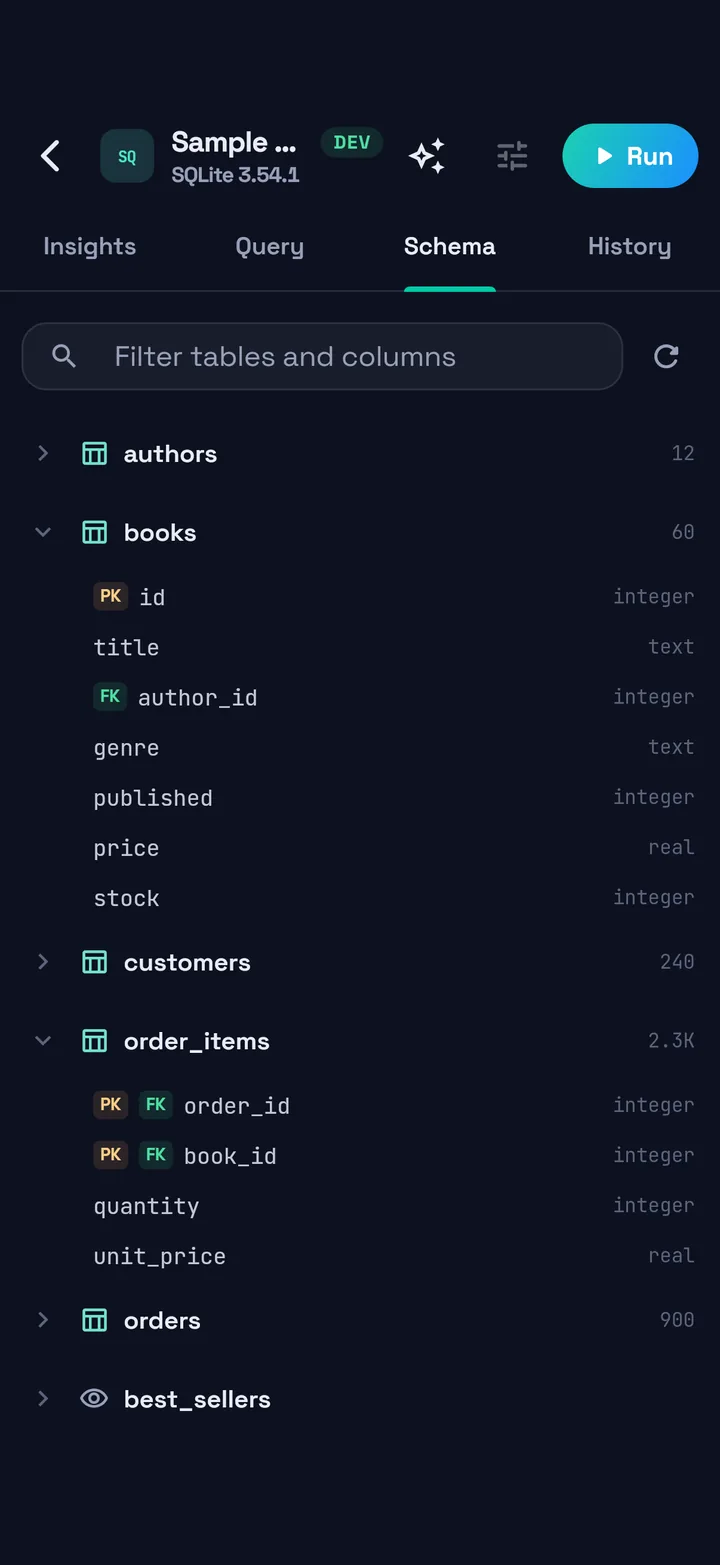
如果你比較想用瀏覽的方式,而不是輸入 SHOW 指令,Tablux 會在可篩選的 schema 樹中列出 MySQL 或 MariaDB 資料庫的資料表與 view,並顯示每個資料表的欄位、型別、primary key、foreign key 和估計筆數(MySQL 的 table_rows),支援 Mac、iPhone 與 iPad。本頁的 SQL 也能在它的編輯器中執行。這些範例已在 MySQL 8.0 與 MariaDB 10.11 上測試過。
常見問題
如何列出 MySQL 資料庫中的所有資料表?
先執行 USE dbname;,再執行 SHOW TABLES;,或一步到位執行 SHOW TABLES FROM dbname;。SHOW FULL TABLES 還會告訴你哪些項目是 view。
如何列出 MySQL 中的所有資料庫?
執行 SHOW DATABASES;。你只會看到帳號有權限的資料庫,除非帳號擁有全域的 SHOW DATABASES 權限。
如何查看 MySQL 資料表的欄位?
執行 DESCRIBE tablename; 或 SHOW COLUMNS FROM tablename;。SHOW CREATE TABLE tablename; 會顯示完整定義,包括 index 與 foreign key。
為什麼 information_schema 顯示的筆數不對?
對 InnoDB 來說,table_rows 是估計值,而且 MySQL 8.0 預設會快取最多一天。需要精確數字請用 SELECT COUNT(*),或用 ANALYZE TABLE 更新估計值。
如何不進入 mysql shell,直接從命令列列出資料表?
使用 mysql -u user -p -e "SHOW TABLES" dbname,加上 -N -B 只輸出名稱,或執行 mysqlshow -u user -p dbname。
更新日期 2026-11-26