 Tablux
Guide
MySQL: show databases, tables and columns
Run SHOW DATABASES; to list databases, USE shop; to pick one, then SHOW TABLES; to list its tables and views (or SHOW TABLES FROM shop; without USE). DESCRIBE orders; lists a table's columns and SHOW CREATE TABLE orders; prints its full definition. The same commands work in MariaDB, and information_schema has the same information as queryable tables.
Show databases
SHOW DATABASES;Database |
|---|
| appdb |
| information_schema |
| mysql |
| performance_schema |
| shop |
| sys |
SHOW DATABASES LIKE 'sh%';          -- filter by name (% and _ are wildcards)

SELECT schema_name                  -- the same list as a query you can join or filter
FROM information_schema.schemata
ORDER BY schema_name;
SHOW SCHEMAS is a synonym. information_schema, mysql, performance_schema and sys are system databases that come with MySQL; your own data is in the others.
You only see databases you have some privilege on, unless your account has the global SHOW DATABASES privilege. A user who can read only shop sees information_schema, performance_schema (on MySQL) and shop, nothing else.
Select a database with USE
USE shop;
SELECT DATABASE();      -- which database is selected? NULL if none
Statements that name a table without a database, such as SHOW TABLES or SELECT * FROM orders, use the selected database. Without one, you get ERROR 1046 (3D000): No database selected. You can also select it when you connect: mysql -u app -p shop.
Show tables
SHOW TABLES;                          -- tables and views in the current database
SHOW TABLES FROM shop;                -- in another database, without USE
SHOW TABLES FROM shop LIKE 'order%';  -- by name pattern
Tables_in_shop (order%) |
|---|
| order_items |
| order_summary |
| orders |
The pattern in LIKE uses % for any characters and _ for exactly one. Because _ is a wildcard, LIKE 'order_%' also matches orders; write LIKE 'order\_%' to match a literal underscore. For conditions other than the name, use WHERE on the output column, as in the next section.
Tables vs views: SHOW FULL TABLES
SHOW TABLES mixes tables and views. Add FULL to get a Table_type column:
SHOW FULL TABLES FROM shop;Tables_in_shop | Table_type |
|---|---|
| customers | BASE TABLE |
| order_items | BASE TABLE |
| order_summary | VIEW |
| orders | BASE TABLE |
| products | BASE TABLE |
SHOW FULL TABLES FROM shop WHERE Table_type = 'VIEW'; -- views onlySHOW TABLES does not list TEMPORARY tables, which exist only in the session that created them.
Show a table's columns: DESCRIBE and SHOW CREATE TABLE
DESCRIBE orders; -- also: DESC orders; SHOW COLUMNS FROM orders;Field | Type | Null | Key | Default | Extra |
|---|---|---|---|---|---|
| id | int | NO | PRI | NULL | |
| customer_id | int | NO | MUL | NULL | |
| ordered_at | date | NO | NULL | ||
| status | varchar(20) | NO | NULL | ||
| total | decimal(10,2) | NO | NULL |
SHOW COLUMNS FROM orders LIKE '%_at';   -- only matching columns
SHOW FULL COLUMNS FROM orders;          -- adds collation, privileges and comments
SHOW CREATE TABLE orders\G              -- the full CREATE TABLE statement
In the Key column, PRI is the primary key, UNI a unique index and MUL the first column of a non-unique index. MariaDB shows integer types with a display width, such as int(11).
DESCRIBE leaves out foreign keys, index names and the table's character set. SHOW CREATE TABLE has everything; end it with \G in the mysql client to print it vertically:
*************************** 1. row ***************************
       Table: orders
Create Table: CREATE TABLE `orders` (
  `id` int NOT NULL,
  `customer_id` int NOT NULL,
  `ordered_at` date NOT NULL,
  `status` varchar(20) NOT NULL,
  `total` decimal(10,2) NOT NULL,
  PRIMARY KEY (`id`),
  KEY `idx_orders_customer` (`customer_id`),
  CONSTRAINT `orders_ibfk_1` FOREIGN KEY (`customer_id`) REFERENCES `customers` (`id`)
) ENGINE=InnoDB DEFAULT CHARSET=utf8mb4 COLLATE=utf8mb4_0900_ai_ci
Show indexes: SHOW INDEX
SHOW INDEX FROM orders;Table | Non_unique | Key_name | Seq_in_index | Column_name | Cardinality | Index_type |
|---|---|---|---|---|---|---|
| orders | 0 | PRIMARY | 1 | id | 7 | BTREE |
| orders | 1 | idx_orders_customer | 1 | customer_id | 4 | BTREE |
The output has more columns than shown here. A multi-column index appears once per column, with Seq_in_index giving the order. Cardinality is an estimate of distinct values, refreshed by ANALYZE TABLE.
The same information from information_schema
The SHOW commands are shortcuts. information_schema holds the same data as views you can filter, join and sort with ordinary SQL, which also works from code and GUI tools:
-- Tables and views in one database, biggest first, with row estimates and size
SELECT table_name, table_type, table_rows,
       ROUND((data_length + index_length) / 1024 / 1024, 2) AS size_mb
FROM information_schema.tables
WHERE table_schema = 'shop'
ORDER BY data_length + index_length DESC;

-- Size of every database
SELECT table_schema AS db,
       ROUND(SUM(data_length + index_length) / 1024 / 1024, 1) AS size_mb
FROM information_schema.tables
GROUP BY table_schema
ORDER BY size_mb DESC;

-- Columns of one table
SELECT column_name, data_type, is_nullable, column_default, column_key
FROM information_schema.columns
WHERE table_schema = 'shop' AND table_name = 'orders'
ORDER BY ordinal_position;

-- Which tables have a column like '%customer%'?
SELECT table_name, column_name
FROM information_schema.columns
WHERE table_schema = 'shop' AND column_name LIKE '%customer%';
Two things to know about the numbers. For InnoDB tables, table_rows is an estimate and can be off by a lot; use SELECT COUNT(*) FROM orders when you need the exact count. And MySQL 8.0 caches these statistics for up to information_schema_stats_expiry seconds (86,400 by default, one day), so a table that just grew may still show old figures; run ANALYZE TABLE orders or SET SESSION information_schema_stats_expiry = 0 to refresh. MariaDB has no such cache. In MySQL, information_schema column names come back in upper case (TABLE_NAME) unless you give them aliases.
From the command line
# run one statement and exit
mysql -u root -p -e "SHOW DATABASES"
mysql -u root -p shop -e "SHOW TABLES"

# names only, one per line (no header, no borders): handy in shell scripts
mysql -u root -p -N -B -e "SHOW TABLES" shop

# keep the table borders when the output goes to a pipe or file
mysql -u root -p --table -e "SHOW TABLES" shop | less

# the mysqlshow utility (mariadb-show on MariaDB)
mysqlshow -u root -p              # databases
mysqlshow -u root -p shop         # tables in shop
mysqlshow -u root -p shop orders  # columns of orders
-N (--skip-column-names) drops the header row and -B (--batch) prints tab-separated values. When output goes to a pipe or a file, mysql switches to that plain format by itself; --table (-t) keeps the boxes. On MariaDB the client is also called mariadb. Avoid putting the password after -p on the command line, where other users can see it in the process list.
Why is my table missing?
- Wrong database. Check
SELECT DATABASE();, or useSHOW TABLES FROM name. Also check you are on the server you think:SELECT @@hostname, @@port;. - No privileges.
SHOW TABLESlists only tables on which you have some privilege, andSHOW TABLES FROMa database you cannot access fails withERROR 1044 (42000): Access denied for user … to database. RunSHOW GRANTS;to see what your account can read (more in MySQL show users). - Upper and lower case. On Linux, table names are case-sensitive by default:
SELECT * FROM Orders;
-- ERROR 1146 (42S02): Table 'shop.Orders' doesn't exist

SELECT @@lower_case_table_names;   -- 0 = names are case-sensitive
lower_case_table_names is 0 by default on Linux (names stored and compared as written), 1 on Windows (stored in lower case, compared without case) and 2 on macOS. A dump made on Windows or a Mac can therefore create orders where the application on Linux asks for Orders. In MySQL 8.0 and later this setting can only be chosen when the data directory is initialised, not changed afterwards. Column names are never case-sensitive.
- It is a temporary table, visible only in the session that created it.
- It was never committed or created. A
CREATE TABLEin a script that stopped early, or a restore into a different database name, is a common cause.
Browsing tables in a GUI
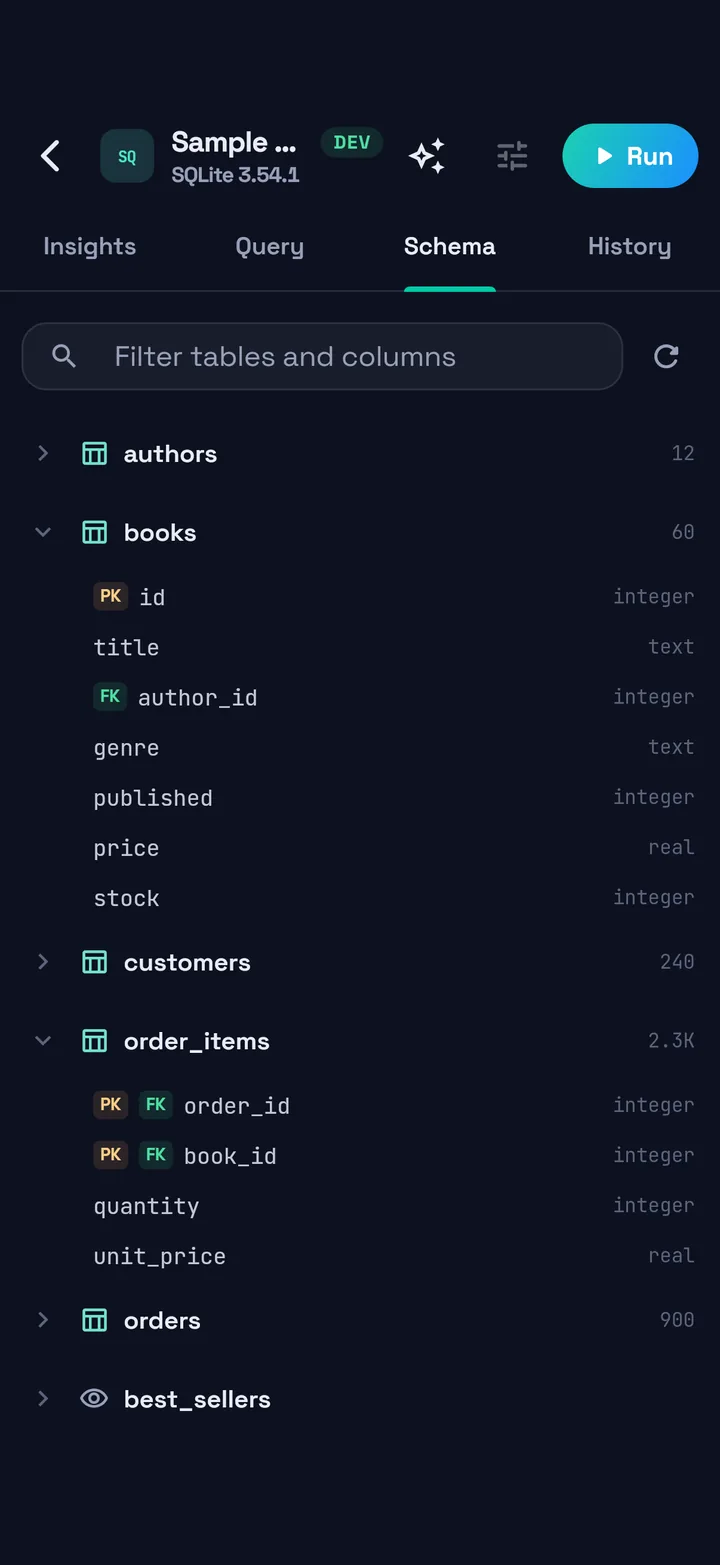
If you would rather browse than type SHOW commands, Tablux lists a MySQL or MariaDB database's tables and views in a schema tree you can filter, with each table's columns, types, primary and foreign keys and estimated row counts (MySQL's table_rows), on Mac, iPhone and iPad. The SQL on this page also runs in its editor. These examples were tested on MySQL 8.0 and MariaDB 10.11.
Questions
How do I show all tables in a MySQL database?
Run USE dbname; and then SHOW TABLES;, or SHOW TABLES FROM dbname; in one step. SHOW FULL TABLES also tells you which entries are views.
How do I list all databases in MySQL?
Run SHOW DATABASES;. You see only the databases your account has privileges on, unless it has the global SHOW DATABASES privilege.
How do I see the columns of a MySQL table?
Run DESCRIBE tablename; or SHOW COLUMNS FROM tablename;. SHOW CREATE TABLE tablename; shows the complete definition, including indexes and foreign keys.
Why does information_schema show the wrong row count?
For InnoDB, table_rows is an estimate, and MySQL 8.0 caches it for up to a day by default. Use SELECT COUNT(*) for an exact number, or ANALYZE TABLE to refresh the estimate.
How do I list tables from the command line without opening the mysql shell?
Use mysql -u user -p -e "SHOW TABLES" dbname, add -N -B for bare names, or run mysqlshow -u user -p dbname.
Updated 2026-11-26