 Tablux
Database client
DynamoDB GUI client for Mac, iPhone and iPad
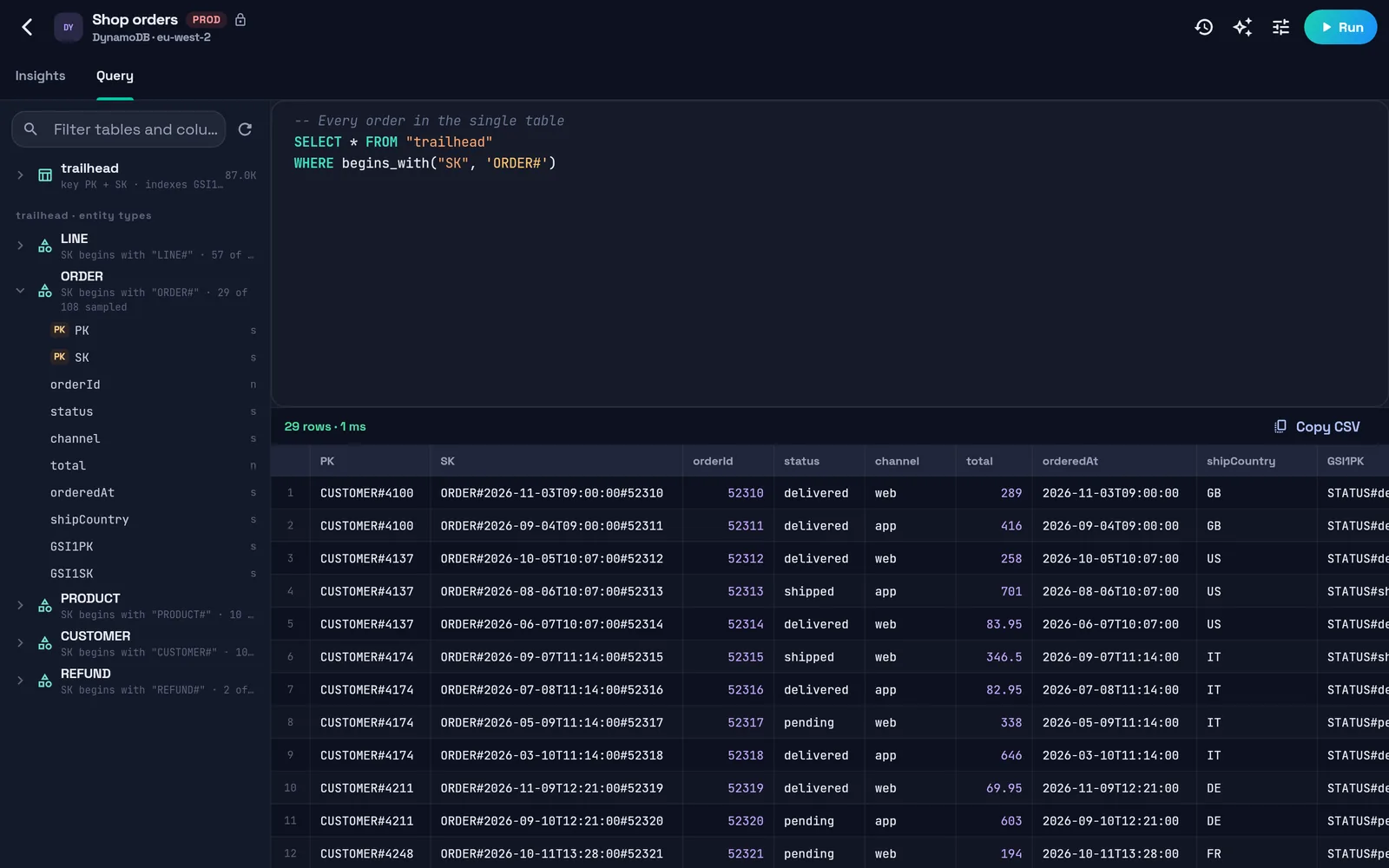
Tablux is a DynamoDB GUI client for Mac, iPhone and iPad. Sign in with an IAM access key and a region, browse tables with their keys and global secondary indexes, and query with PartiQL. For single-table designs, Tablux finds the entity types in a sample of items (CUSTOMER#, ORDER#…) and lets you open each one on its own.
What connecting needs
| Field | What to enter |
|---|---|
| Region | Where the tables live, e.g. eu-west-2 |
| Access key ID | An IAM user’s key, AKIA… |
| Secret access key | Stored in the system keychain on this device only |
| Endpoint (optional) | Empty for AWS (dynamodb.<region>.amazonaws.com). Type localhost and a port for DynamoDB Local |
Tablux signs each request with AWS Signature Version 4 on your device and talks to the DynamoDB endpoint directly. For temporary credentials (IAM Identity Center, an assumed role) also paste the session token; it is kept in the keychain like the secret, and you replace it when the credentials expire. Long-term IAM user keys need no token.
A key for browsing and querying only needs these actions. Scan is for the item sample behind the schema view, and DescribeContinuousBackups for the backup finding:
{
  "Version": "2012-10-17",
  "Statement": [{
    "Effect": "Allow",
    "Action": [
      "dynamodb:ListTables",
      "dynamodb:DescribeTable",
      "dynamodb:Scan",
      "dynamodb:PartiQLSelect",
      "dynamodb:DescribeContinuousBackups"
    ],
    "Resource": "*"
  }]
}
Narrow Resource to your table ARNs (and table/<name>/index/* for indexes) once it works; ListTables needs *.
Querying with PartiQL
The editor speaks DynamoDB’s PartiQL, one statement at a time. PartiQL has no LIMIT, so Tablux accepts a trailing LIMIT n on a SELECT, strips it and stops fetching at n items. AWS’s rule to remember: a SELECT whose WHERE doesn’t fix the partition key with = or IN is a full table scan and consumes read capacity across the whole table.
-- One customer's partition (a query, not a scan)
SELECT * FROM "AppTable" WHERE "PK" = 'CUSTOMER#1042'
-- Just that customer's orders in a single-table design
SELECT * FROM "AppTable"
WHERE "PK" = 'CUSTOMER#1042' AND begins_with("SK", 'ORDER#')-- Through a global secondary index, first 50 items
SELECT * FROM "AppTable"."GSI1" WHERE "GSI1PK" = 'STATUS#pending' LIMIT 50-- A write: on a production connection Tablux asks first
UPDATE "AppTable" SET "status" = 'shipped'
WHERE "PK" = 'CUSTOMER#1042' AND "SK" = 'ORDER#2026-0042'Items come back as rows: key attributes first, typed DynamoDB JSON shown as plain values, maps and lists as compact JSON. Tap a row to see every value in full, then copy a value, the row as JSON or the whole result as CSV. A result stops at 5,000 rows. The PartiQL guide covers the syntax in depth.
Keys, indexes and entity types
Each table shows its key (partition key, plus sort key if it has one) and its global secondary indexes on one line, the approximate item count DynamoDB reports, and the attributes found in a scan of up to 1,000 items, with their types (S, N, BOOL, M, L…) and whether every sampled item has them.
For single-table designs, Tablux works out the entity types from that sample: a type attribute such as entityType or type when most items have one, otherwise the prefix of the sort key (ORDER# in ORDER#2026-0042), otherwise the prefix of the partition key. Each type is listed under its table with how it was recognised, for example “SK begins with "ORDER#" · 412 of 1000 sampled”. Tap one and the editor gets a query for just those items: a begins_with on the key, or an equality on the type attribute.
Insights on DynamoDB
DynamoDB’s PartiQL can’t group or count, so there is no AI dashboard for this engine. Insights shows each table’s size, its number of secondary indexes and the entity types found, and flags:
- tables on provisioned capacity, with their read and write units: traffic above that is throttled
- tables with point-in-time recovery switched off
- empty tables
Read-only on DynamoDB
DynamoDB has no read-only session. With Read-only on, Tablux’s session refuses any statement that isn’t a SELECT before it is sent, and the form says that the real guarantee is the server side: an IAM key whose policy only allows reads, like the one above.
Tag the connection Production and every request that changes data asks first. A new connection tagged Production starts with Read-only on. More on production safety.
Limits
- Access keys only: no session tokens, SSO or named profiles.
- No SSH tunnel; DynamoDB is reached over HTTPS at its AWS endpoint.
- One PartiQL statement per run, through
ExecuteStatement; no PartiQL transactions. - Entity types and attributes come from a 1,000-item sample, so a rare item type can be missed.
- No editing in the results grid; change items with PartiQL.
Questions
Can Tablux connect to DynamoDB Local?
Yes. Put localhost in Endpoint with the port DynamoDB Local listens on (8000 by default), turn SSL off, and fill in a region and access key.
Does a SELECT in Tablux cost read capacity?
Yes, like any read. A SELECT that does not fix the partition key with = or IN scans the whole table, so filter on the key or query an index.
Can I sign in with AWS SSO or a role?
Not yet. Tablux takes an access key ID and secret access key and has no field for a session token.
How does Tablux find entity types?
From a scan of up to 1,000 items: a type attribute if most items have one, otherwise the prefix of the sort key or partition key, such as ORDER#.