 Tablux
Feature
Text to SQL that shows its work: the Tablux AI assistant
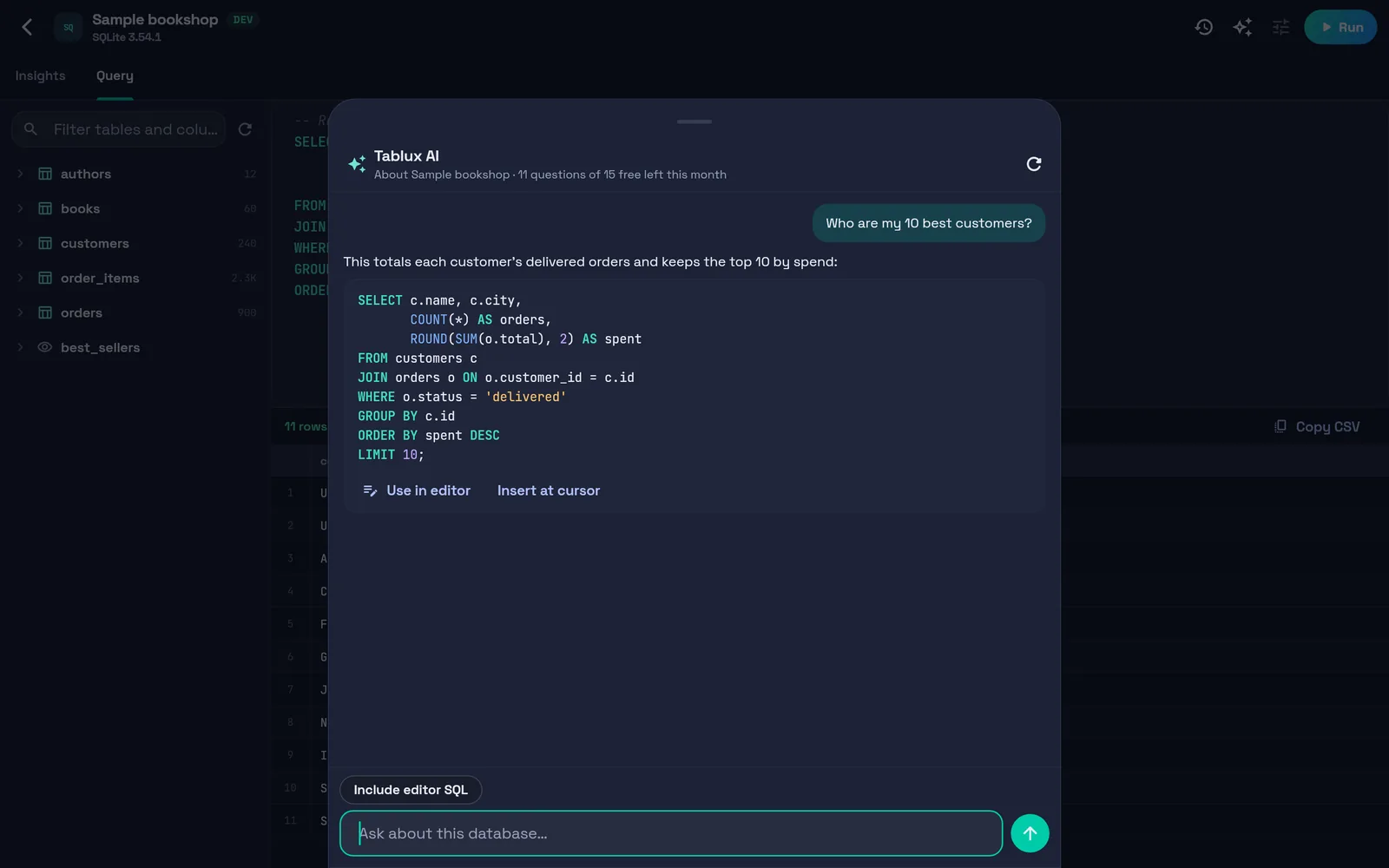
Text to SQL turns a plain-English question into a query. It works when the model knows your real tables and columns, and it fails quietly when it has to guess. Tablux's assistant sends Claude your schema (never your rows), gets back a query in your database's own language and puts it in your editor. Nothing runs until you have read it and pressed Run.
What text to SQL is
A text-to-SQL tool gives a language model two things: your question, and a description of the database. The model writes a query that should answer the question against that database. The description is what separates a useful answer from a plausible one. Without it, the model invents names that sound right (customer_id where your column is cust_ref, a users table you don't have). With the table and column names, types and foreign keys, it can pick real tables and join them on real keys.
The dialect matters too. Grouping by month is date_trunc('month', created_at) on PostgreSQL, DATE_FORMAT(created_at, '%Y-%m') on MySQL and strftime('%Y-%m', created_at) on SQLite. A generator that doesn't know which database you use will hand you the wrong one.
How AI-written SQL goes wrong
Most mistakes fall into a few groups, and they are not equally easy to spot:
- Made-up tables or columns. The query fails with an error. Annoying, but safe.
- A join that multiplies rows. The query runs and the numbers are wrong. Joining orders to their line items before summing order totals counts each order once per line:
-- Inflated: o.total is repeated for every line item SELECT c.name, SUM(o.total) AS spent FROM customers c JOIN orders o ON o.customer_id = c.id JOIN order_items i ON i.order_id = o.id GROUP BY c.name; - The wrong meaning. “Customers” when you meant active customers, a status value that doesn't exist,
COUNT(column)skipping NULLs where you wantedCOUNT(*), “last month” in the wrong time zone. - A query that is too expensive. No LIMIT, or a filter on an unindexed column of a large table.
- A write that reaches too far. An UPDATE whose WHERE clause matches more rows than you think, or none at all.
So read before you run: check the tables and join keys, the filters, what each row of the result represents, and the LIMIT. Run anything new on a read-only connection first. A model is good at the syntax; you are the one who knows what the data means.
How the Tablux assistant works
- Grounded in your schema. Each conversation starts with the database's tables, views, columns, types, primary keys and foreign key references, and the engine and version. Claude is told to use only those names, and to say what is missing rather than guess when the schema can't answer the question. Very large schemas are cut at about 60,000 characters, and the prompt says how many tables were left out.
- Your database's own language. SQL for PostgreSQL, MySQL and MariaDB, or SQLite. PartiQL for DynamoDB, where it knows there is no JOIN, GROUP BY or COUNT, and says when a statement would scan the whole table. mongosh calls for MongoDB (
find,aggregate,countDocumentsand the like), which Tablux parses rather than running as JavaScript. Elasticsearch or OpenSearch SQL, or a Kibana-style console request when SQL can't express it. - Explain and fix, too. Tick Include editor SQL to ask about the query in your editor, or Include last error to get a fix for the one that just failed. Follow-up questions keep the conversation's context.
- Into the editor, never run. Each answer's query has Use in editor (replaces what is there) and Insert at cursor. The assistant has no way to run anything.
- The same guards as your own SQL. When you run it, a write on a Production connection asks first, a DELETE or UPDATE without WHERE needs the connection name typed, and a read-only connection refuses writes. The assistant is told to write changes with a precise WHERE and to say plainly what they will change. See production safety.
The same model also writes the Insights dashboard for a new connection. The model is Claude Opus, by Anthropic, whichever plan you use.
What is sent, and what never is
The assistant asks for your permission before it sends anything the first time. Each question then sends:
- your question, and the earlier turns of the same conversation;
- the schema: table, view and column names, column types, primary and foreign keys, and the engine and version (the Insights dashboard request also includes approximate row counts per table);
- only if you tick them, the SQL in your editor and the last error message.
It never sends your rows, query results, passwords or connection details. With Tablux AI the request goes to the Tablux AI service, which passes it to Anthropic and keeps nothing but a count of your questions this month. With your own API key it goes straight from your device to Anthropic. You can stop the assistant sending anything in Settings. The details are in the privacy policy.
Plans
| Questions a month | Cost | |
|---|---|---|
| Included with Tablux | 15 | Included in the purchase; needs iOS or iPadOS 18.4, or macOS 15.4, or later |
| Tablux AI subscription | 200 | $9.99 a month or $79.99 a year, auto-renews, cancel any time in your Apple Account settings |
| Your own Anthropic API key | Not counted by Tablux | You pay Anthropic for what you use |
Questions reset on the 1st of each month (UTC), and unused ones don't carry over. A follow-up is a question, and so is building a dashboard. If Anthropic fails to answer, the question isn't counted. More on pricing.
Questions
Does the AI see my data?
No. It sees your schema: table and column names, types and keys. Rows and query results are never sent, and nothing is sent until you have agreed to it.
Will the assistant run queries on my database?
No. Its query goes into your editor and runs only when you press Run, with the same confirmations as anything you type yourself.
Which databases does it write queries for?
PostgreSQL, MySQL and MariaDB, SQLite, DynamoDB (PartiQL), MongoDB (mongosh calls), Elasticsearch and OpenSearch (SQL or console requests).
Is the text-to-SQL assistant free?
Every copy of Tablux includes 15 questions a month on iOS or iPadOS 18.4, or macOS 15.4, or later. The Tablux AI subscription gives 200 a month, or you can use your own Anthropic API key.
Can I use my own Anthropic API key?
Yes. Paste a key from console.anthropic.com in Settings; it is stored in the system keychain and requests go straight from your device to Anthropic.
Which AI model does Tablux use?
Claude Opus, by Anthropic, for both Tablux AI and your own API key.