 Tablux
Feature
Production safety: writes ask first, and read-only means read-only
Tag a connection Production and every statement that changes data asks before it runs. DROP, TRUNCATE and an UPDATE or DELETE without WHERE are flagged on any connection, and on production you type the connection's name to run them. A read-only connection refuses writes in Tablux and, on PostgreSQL, MySQL and SQLite, in the database server itself.
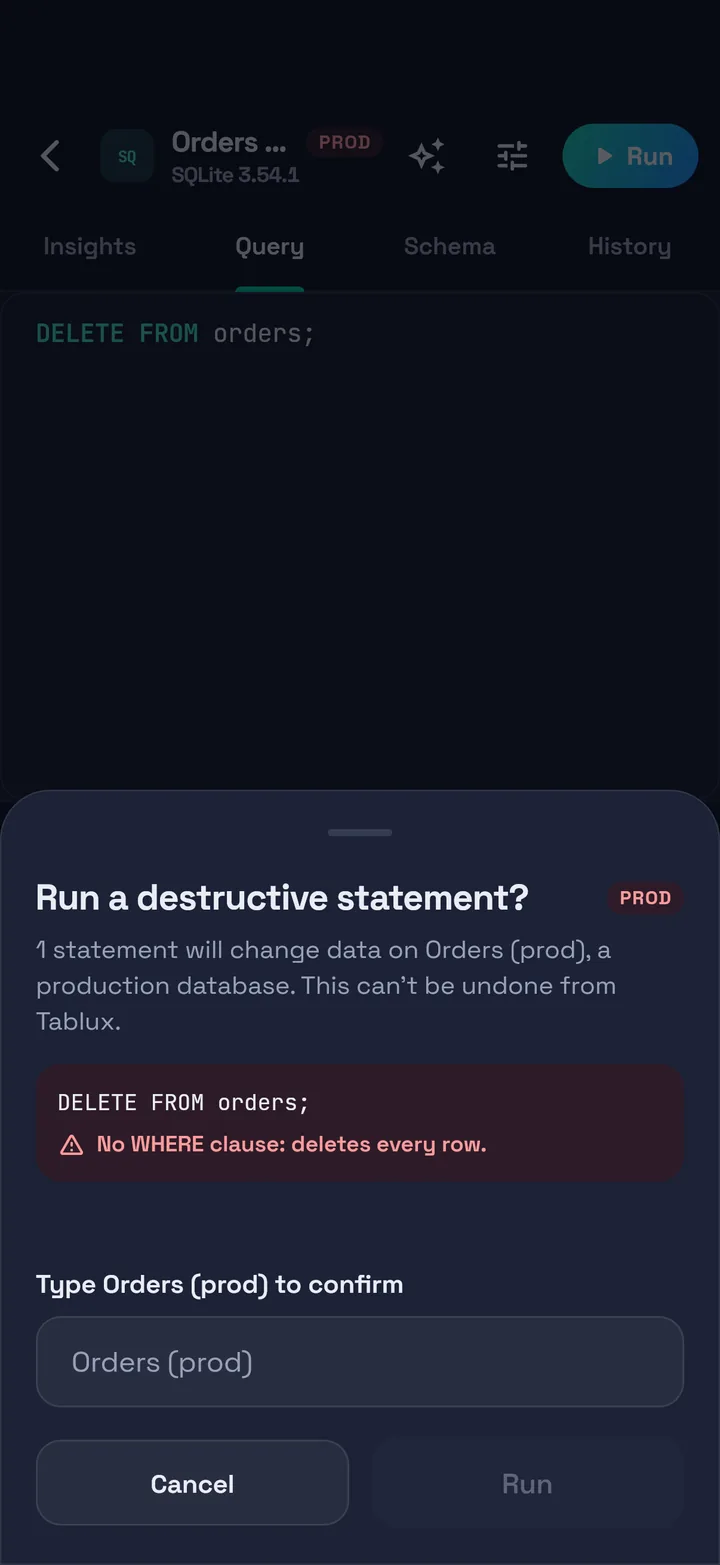
Tag every connection with its environment
Each connection can be tagged Development, Staging or Production. The tag shows as a coloured DEV, STG or PROD badge next to the connection name wherever you work, so you know where a query is going before you run it. A new connection tagged Production also starts with Read-only switched on, unless you change it.
What asks before it runs
Before anything runs, Tablux splits your script into statements and classifies each one: a read, a write (INSERT, UPDATE, DELETE, MERGE, COPY…), a schema change (CREATE, ALTER, DROP, TRUNCATE, GRANT…) or session control (BEGIN, COMMIT, SET). Then:
| Statement | Development / Staging | Production |
|---|---|---|
| Reads (SELECT, SHOW, EXPLAIN) | Runs | Runs |
| Writes and schema changes | Runs | Asks first, listing each statement |
| Dangerous statements | Asks first | Asks first, and you type the connection name |
| Any write on a read-only connection | Refused | Refused |
The classifier errs towards caution. A statement it doesn't recognise counts as a write. SELECT … INTO new_table counts as a write, as does EXPLAIN ANALYZE of an UPDATE or DELETE (it really runs the statement), a WITH query that contains a DELETE, and a SQLite PRAGMA that sets a value.
What counts as dangerous
Dangerous means easy to regret: one statement that removes or rewrites everything it can reach.
- SQL and PartiQL:
DROP,TRUNCATE, andUPDATEorDELETEwith no top-levelWHERE, including inside aWITHquery. - Elasticsearch and OpenSearch:
DELETEof a whole index (or_all, or a wildcard),_delete_by_queryor_update_by_querywithmatch_allor no query,_reindex, closing an index, and a SQL DELETE. - MongoDB:
deleteManyorupdateManywith an empty filter{}, anddrop,dropDatabaseordropIndexes. Anaggregatewith$outor$mergecounts as a write, and a call Tablux can't parse is treated as one too.
The check reads the statement's shape; it doesn't estimate how many rows will change. DELETE FROM orders WHERE 1 = 1 has a WHERE, so it is a normal write: on Production it still asks first, but it won't need the name typed.
Read-only connections, enforced by the server
Switch on Read-only for a connection and Tablux refuses any statement that changes data before sending it. On the SQL engines it also asks the database to refuse writes for the whole session:
- PostgreSQL:
SET SESSION CHARACTERISTICS AS TRANSACTION READ ONLY - MySQL and MariaDB:
SET SESSION TRANSACTION READ ONLY - SQLite:
PRAGMA query_only = ON
Statements that would switch that off again, such as SET SESSION CHARACTERISTICS AS TRANSACTION READ WRITE, RESET ALL, DISCARD ALL, SET ROLE, set_config('default_transaction_read_only', 'off', …) or PRAGMA query_only = 0, are refused on a read-only connection.
That second layer catches what a classifier can't see. SELECT archive_old_orders(); looks like a read, but if that PostgreSQL function deletes rows, the server stops it with cannot execute DELETE in a read-only transaction.
Elasticsearch, OpenSearch, DynamoDB and MongoDB have no read-only session to switch on, so on those Tablux's own session refuses every request that isn't a read. The connection form says so and recommends signing in as a read-only user for a guarantee.
Insights always uses a separate read-only connection of its own, whatever the connection's setting. See Insights.
Why three layers
Each layer covers a gap in another. The classifier can misjudge a statement, and the server-side read-only setting catches that. The server setting only exists on connections you have marked read-only, so on a writable production connection the confirmation sheet catches the write you meant to run somewhere else. And the typed name stops the one statement where a reflex tap on Run would be expensive.
None of them replaces database permissions. A session setting guards against mistakes, but it isn't a permission: the session could change it back. The real boundary is a database user that can only read.
Create a read-only database user
On PostgreSQL, as the owner of the tables:
CREATE ROLE readonly_user LOGIN PASSWORD 'choose-a-strong-password';
GRANT CONNECT ON DATABASE appdb TO readonly_user;
GRANT USAGE ON SCHEMA public TO readonly_user;
GRANT SELECT ON ALL TABLES IN SCHEMA public TO readonly_user;
-- tables this role creates later
ALTER DEFAULT PRIVILEGES IN SCHEMA public GRANT SELECT ON TABLES TO readonly_user;
On PostgreSQL 14 and later, GRANT pg_read_all_data TO readonly_user; grants read access to every table in every schema in one line. The full walk-through is in Postgres read-only user.
On MySQL or MariaDB:
CREATE USER 'readonly_user'@'%' IDENTIFIED BY 'choose-a-strong-password';
GRANT SELECT, SHOW VIEW ON appdb.* TO 'readonly_user'@'%';
Narrow '%' to the host you connect from if you can. More in creating a read-only user in MySQL. Then sign in as that user in Tablux and switch on Read-only as well: the app refuses the write before the server has to.
What it doesn't do
- It can't undo a statement once it has run. The confirmation sheet says so.
- It doesn't count the rows a statement will touch; it reads the statement.
- It isn't a substitute for backups, least-privilege users or point-in-time recovery.
Questions
How do I stop running a DELETE without WHERE by accident?
Tablux flags UPDATE and DELETE without WHERE, DROP and TRUNCATE on every connection and asks before running them. On a Production connection you also have to type the connection's name.
Is a read-only connection really read-only?
On PostgreSQL, MySQL, MariaDB and SQLite the database server refuses writes for the session as well as Tablux. On Elasticsearch, OpenSearch, DynamoDB and MongoDB Tablux refuses them; sign in as a read-only user for a guarantee.
Can I turn off the confirmations on production?
They follow the connection's tag. Writes ask first only on connections tagged Production; dangerous statements ask on every connection.
Does the AI assistant get around these guards?
No. The assistant only puts SQL in your editor; when you run it, it goes through the same checks as anything you type.
What about statements Tablux doesn't recognise?
They are treated as writes, so on Production they ask first and on a read-only connection they are refused.