 Tablux
Guide
DynamoDB GSI: how global secondary indexes work
A global secondary index (GSI) is a copy of a DynamoDB table's items organised by a different partition key and optional sort key, so you can Query by attributes that aren't the table's key. DynamoDB keeps it in sync asynchronously, so its reads are eventually consistent. You pay for its storage and for every table write that changes it. A table can have 20 GSIs by default.
What a GSI is
A DynamoDB Query must name a partition key value. On the table itself that means the table's own key, so a question like "which orders are still pending?" turns into a Scan that reads every item. A global secondary index fixes that by keeping a second copy of the data, organised by keys you choose.
- Any attributes can be the key. The index partition key, and the optional sort key, can be any top-level
String,NumberorBinaryattribute. They don't have to be the table's key attributes. - Keys don't have to be unique. Many items can share the same index key values, and a Query returns them all.
- "Global" means across all partitions. A query on the index can return items from anywhere in the table, unlike a local secondary index, which is tied to one partition key value.
- Only Query and Scan.
GetItemandBatchGetItemdon't work on an index, and you never write to an index directly.
Since November 2025 a GSI key can also be built from several attributes (up to four for the partition key and four for the sort key) instead of one concatenated string. The examples below use single-attribute keys.
Key schema and projections
When you create an index you choose its key schema and its projection: which attributes are copied into it. The table's partition and sort key are always copied.
| Projection | What the index holds | Trade-off |
|---|---|---|
KEYS_ONLY | Table keys and index keys | Smallest and cheapest to write; you fetch other attributes with a second request |
INCLUDE | Keys plus the attributes you list | Good when a query needs a few fields; at most 100 listed attributes across all of a table's indexes |
ALL | Every attribute | Most flexible; can double storage and makes every update touch the index |
A query on a GSI can only return projected attributes. It cannot reach back into the table for the rest, so with KEYS_ONLY you follow up with a GetItem or BatchGetItem on the table. Project what the access pattern actually shows, no more.
Eventually consistent reads
DynamoDB updates global secondary indexes asynchronously. AWS says changes normally reach the index "within a fraction of a second", but longer delays are possible, and GSIs don't support strongly consistent reads at all: ConsistentRead must be false.
Design for it. If a user creates an order and the next screen lists their pending orders from the index, the new order may be missing for a moment. Read the item you just wrote from the table by its key, or merge it into the list in your application.
Sparse indexes
An item enters a GSI only if it has all of the index key attributes. Leave them off and the item is not indexed, costs nothing in the index, and never shows up in its queries. That is a sparse index, and it is one of the most useful patterns in DynamoDB.
Say only open orders should be findable by status. Write GSI1PK = STATUS#pending while an order is open and remove the attribute when it is delivered. The index then holds open orders only, however large the table grows. In PartiQL the removal is one statement:
UPDATE "trailhead" REMOVE "GSI1PK" REMOVE "GSI1SK"
WHERE "PK" = 'CUSTOMER#1042' AND "SK" = 'ORDER#2026-10-14T09:31:00#58213'
Overloading one GSI in a single-table design
In a single-table design several entity types share a table, and they can share an index too. The index key attributes get generic names, and each entity type puts a different kind of value in them. The Trailhead shop table uses one index, GSI1, for two access patterns:
Item       PK               SK                                 GSI1PK           GSI1SK
Order      CUSTOMER#1042    ORDER#2026-10-14T09:31:00#58213    STATUS#pending   2026-10-14T09:31:00
Product    PRODUCT#17       PRODUCT#17                         CATEGORY#Tents   PRODUCT#Ridgeline 2P tent
Customer   CUSTOMER#1042    CUSTOMER#1042                      -                -
Line       ORDER#58213      LINE#17                            -                -
On orders, GSI1PK is the status and GSI1SK the order time, so "pending orders, oldest first" is one Query. On products, the same attributes hold the category and name, so "tents, A to Z" is another. Customers and order lines have no GSI1PK, so the index stays sparse. One overloaded index serves several patterns and stays well under the per-table quota.
What a GSI costs
An index is not free storage space. You pay three ways:
- Writes. Every table write that changes the index costs index write units as well. A new item with the index keys: one index write. A change to an index key value (
STATUS#pendingtoSTATUS#shipped): two, one to delete the old entry and one to add the new. Removing the key attribute: one. A change to an attribute that is neither an index key nor projected: nothing. Each index write is sized by the index entry, rounded up to 1 KB. - Storage. Each index entry costs the size of the table keys, the index keys and the projected attributes, plus 100 bytes of overhead.
- Reads. Queries on the index are charged by the size of the index entries returned, rounded up to 4 KB per request. Because GSI reads are eventually consistent, one read unit covers 8 KB.
So shipping an order of under 1 KB in the Trailhead table costs one write unit on the table and two on GSI1. Five indexes with ALL projections can make writes several times dearer than the table alone. The DynamoDB pricing guide puts numbers on this.
Throttling and back-pressure
A GSI has its own partitions, split by the index partition key. If the index can't absorb the updates, DynamoDB throttles the writes to the base table, even when the table has spare capacity. AWS calls this GSI back-pressure. The exception points at the index (in ResourceArn) with a reason such as IndexWriteProvisionedThroughputExceeded or IndexWriteKeyRangeThroughputExceeded.
- Provisioned tables: give each GSI write capacity at least equal to the table's, as AWS recommends.
- On-demand tables too: each index partition has its own throughput limit, so a low-cardinality index key concentrates writes.
STATUS#deliveredwill one day hold almost every order. Shard the value (STATUS#delivered#0to#9) or keep the index sparse. - Adding an index to a busy table: backfill writes compete with live traffic. AWS suggests quiet hours and watching
OnlineIndexPercentageProgressand the table'sWriteThrottleEvents.
GSI vs LSI
A local secondary index (LSI) keeps the table's partition key and adds a different sort key. The differences matter more than the names suggest:
| Global secondary index | Local secondary index | |
|---|---|---|
| Partition key | Any attribute | Same as the table |
| When you can create it | Any time (one per UpdateTable) | Only with CreateTable |
| How many per table | 20 by default (raise through AWS Support) | 5, not adjustable |
| Read consistency | Eventually consistent only | Eventually or strongly consistent |
| Capacity | Its own | Shares the table's |
| Size limit | None | 10 GB per partition key value, table and index items together |
| Attributes not projected | Not available | Fetched from the table, at extra read cost |
Default to a GSI. An LSI makes sense only when you need strongly consistent reads in a different sort order within one partition key, and you are sure no item collection will approach 10 GB. Once a table has an LSI, that 10 GB ceiling applies to every partition key value, and you can't remove the LSI without recreating the table.
Creating a GSI
Console: open the table, go to the Indexes tab and choose Create index. Pick the partition key, an optional sort key and the projection.
AWS CLI: add GSI1 to an existing on-demand table. New key attributes need an attribute definition:
aws dynamodb update-table --table-name trailhead \
  --attribute-definitions AttributeName=GSI1PK,AttributeType=S AttributeName=GSI1SK,AttributeType=S \
  --global-secondary-index-updates '[{"Create": {
    "IndexName": "GSI1",
    "KeySchema": [{"AttributeName": "GSI1PK", "KeyType": "HASH"},
                  {"AttributeName": "GSI1SK", "KeyType": "RANGE"}],
    "Projection": {"ProjectionType": "ALL"}
  }}]'
On a provisioned table, add "ProvisionedThroughput": {"ReadCapacityUnits": 5, "WriteCapacityUnits": 5} inside Create. For an INCLUDE projection use {"ProjectionType": "INCLUDE", "NonKeyAttributes": ["orderId", "total"]}.
The table stays available while DynamoDB builds the index. It first allocates resources, then backfills existing items; the index is usable once its status is ACTIVE. AWS doesn't charge for the reads from the table during the backfill. Check progress with:
aws dynamodb describe-table --table-name trailhead \
  --query "Table.GlobalSecondaryIndexes[].[IndexName,IndexStatus,Backfilling]"
Items whose index key has the wrong type, or an empty string, are left out of the index. To remove an index: --global-secondary-index-updates '[{"Delete": {"IndexName": "GSI1"}}]'.
CloudFormation:
Table:
  Type: AWS::DynamoDB::Table
  Properties:
    TableName: trailhead
    BillingMode: PAY_PER_REQUEST
    AttributeDefinitions:
      - { AttributeName: PK, AttributeType: S }
      - { AttributeName: SK, AttributeType: S }
      - { AttributeName: GSI1PK, AttributeType: S }
      - { AttributeName: GSI1SK, AttributeType: S }
    KeySchema:
      - { AttributeName: PK, KeyType: HASH }
      - { AttributeName: SK, KeyType: RANGE }
    GlobalSecondaryIndexes:
      - IndexName: GSI1
        KeySchema:
          - { AttributeName: GSI1PK, KeyType: HASH }
          - { AttributeName: GSI1SK, KeyType: RANGE }
        Projection: { ProjectionType: ALL }
A stack update can create or delete only one index at a time; change two and the update fails. CloudFormation starts the index build and moves on without waiting for ACTIVE.
Querying a GSI
Pass the index name with the table name. Pending orders placed before October, oldest first:
aws dynamodb query --table-name trailhead --index-name GSI1 \
  --key-condition-expression "GSI1PK = :s AND GSI1SK < :d" \
  --expression-attribute-values '{":s":{"S":"STATUS#pending"},":d":{"S":"2026-10-01"}}'
Add --no-scan-index-forward for newest first. In PartiQL, put the index after the table, both in double quotes:
SELECT "PK", "orderId", "total", "orderedAt" FROM "trailhead"."GSI1"
WHERE "GSI1PK" = 'CATEGORY#Tents'
Pin the index partition key with =, or the statement scans the whole index. The PartiQL guide covers paging and the other rules.
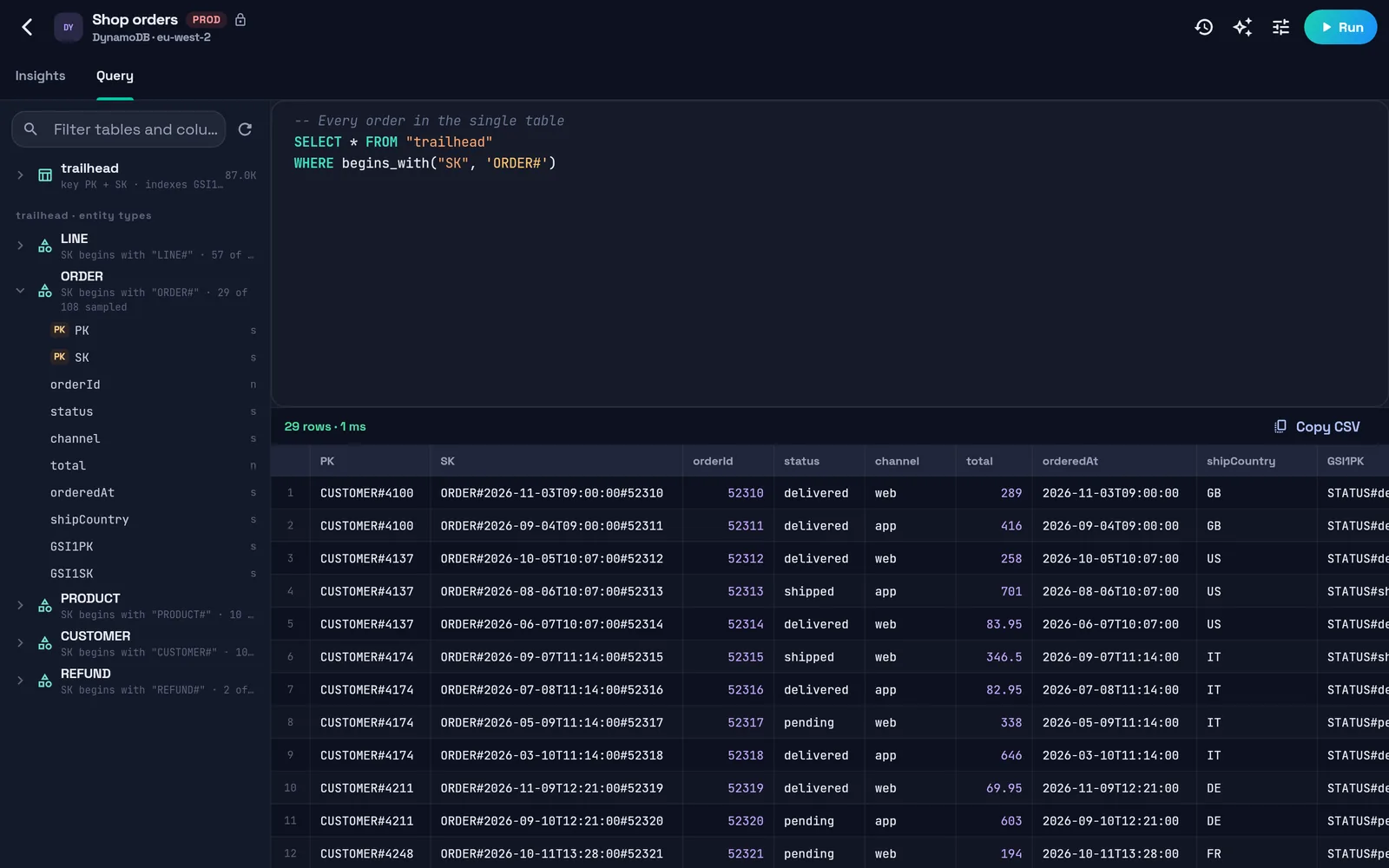
Seeing a table's indexes in Tablux
Tablux lists each DynamoDB table with its key and its global secondary indexes, for example key PK + SK · indexes GSI1(GSI1PK, GSI1SK), next to the entity types it infers from a sample of items. You query an index in PartiQL with "table"."index", from a Mac, iPhone or iPad. Insights counts each table's indexes and flags tables on provisioned capacity, where a busy GSI can throttle writes.
Questions
Can I add a GSI to an existing DynamoDB table?
Yes. UpdateTable adds one global secondary index per call, and the table stays available while DynamoDB backfills it. Local secondary indexes, by contrast, can only be created with the table.
Can I read from a GSI with strong consistency?
No. Global secondary indexes only support eventually consistent reads. If you need the latest value, read the item from the table by its primary key.
How many global secondary indexes can a table have?
20 by default, and AWS Support can raise it. A table can also have up to 5 local secondary indexes, a limit that can't be changed.
Do GSI keys have to be unique?
No. Many items can share the same index partition and sort key values; a Query on the index returns all of them.
What happens to items that don't have the index key attribute?
They are not written to the index. That makes the index sparse: smaller, cheaper, and limited to the items you want to find that way.
Does a GSI make writes more expensive?
Yes. Each table write that adds, changes or removes an index entry also consumes write units for the index, and changing an index key value costs two index writes.
Updated 2026-11-25