 Tablux
Guide
SQL GROUP BY, with examples
GROUP BY collapses rows that share the same values into one row per group, so aggregate functions such as COUNT, SUM and AVG can summarise each group: SELECT customer_id, COUNT(*), SUM(total) FROM orders GROUP BY customer_id; returns one row per customer. Every column in the SELECT list must either appear in GROUP BY or be inside an aggregate function.
GROUP BY basics
The examples use two small tables, the same ones as in the CTE guide:
-- orders(id, customer_id, ordered_at, total)
(1, 1, '2026-01-05', 120.00)   (5, 2, '2026-02-02',  80.00)
(2, 2, '2026-01-09',  80.00)   (6, 1, '2026-02-25',  60.00)
(3, 1, '2026-01-20',  45.00)   (7, 3, '2026-03-03', 150.00)
(4, 3, '2026-02-02', 200.00)   (8, 2, '2026-03-18',  95.00)

-- customers(id, name, country)
(1, 'Ana', 'Spain')   (2, 'Ben', 'Canada')   (3, 'Chen', NULL)   (4, 'Dara', 'Spain')
One row per customer, with the number of orders, revenue, average order and latest order date:
SELECT customer_id,
       COUNT(*)   AS orders,
       SUM(total) AS revenue,
       ROUND(AVG(total), 2) AS avg_order,
       MAX(ordered_at) AS last_order
FROM orders
GROUP BY customer_id
ORDER BY customer_id;
customer_id | orders | revenue | avg_order | last_order |
|---|---|---|---|---|
| 1 | 3 | 225.00 | 75.00 | 2026-02-25 |
| 2 | 3 | 255.00 | 85.00 | 2026-03-18 |
| 3 | 2 | 350.00 | 175.00 | 2026-03-03 |
The database reads the rows that pass WHERE, puts rows with the same customer_id into a group, computes each aggregate per group, and returns one row per group. Without ORDER BY the groups can come back in any order, so always sort explicitly.
Aggregate functions
| Function | Returns | NULLs |
|---|---|---|
COUNT(*) | Number of rows in the group | Counted |
COUNT(col) | Number of non-NULL values | Skipped |
COUNT(DISTINCT col) | Number of different non-NULL values | Skipped |
SUM(col), AVG(col) | Total, average | Skipped; NULL if all are NULL |
MIN(col), MAX(col) | Smallest, largest (numbers, dates, text) | Skipped |
string_agg(col, ', ') | Values joined into one string (PostgreSQL, SQLite 3.44+); GROUP_CONCAT in MySQL, MariaDB and SQLite | Skipped |
An aggregate without GROUP BY treats the whole table as one group: SELECT COUNT(*), SUM(total) FROM orders; returns a single row.
GROUP BY multiple columns
List several columns to get one row per distinct combination:
SELECT c.country, c.name, SUM(o.total) AS revenue
FROM orders o
JOIN customers c ON c.id = o.customer_id
GROUP BY c.country, c.name
ORDER BY c.country, c.name;
country | name | revenue |
|---|---|---|
| Canada | Ben | 255.00 |
| Spain | Ana | 225.00 |
| NULL | Chen | 350.00 |
The order of the columns in GROUP BY does not change the result, only ORDER BY decides how it is sorted. Where the NULL group sorts depends on the database: PostgreSQL puts NULL last in ascending order, MySQL, MariaDB and SQLite put it first.
WHERE vs HAVING
WHERE filters rows before they are grouped; HAVING filters groups after the aggregates are computed. You can use both:
SELECT customer_id, SUM(total) AS revenue
FROM orders
WHERE ordered_at >= '2026-02-01'     -- rows: only orders from February on
GROUP BY customer_id
HAVING SUM(total) > 150              -- groups: only customers above 150
ORDER BY customer_id;
customer_id | revenue |
|---|---|
| 2 | 175.00 |
| 3 | 350.00 |
Aggregates are not allowed in WHERE, because the groups don't exist yet:
SELECT customer_id FROM orders WHERE SUM(total) > 250 GROUP BY customer_id;
-- PostgreSQL:      ERROR: aggregate functions are not allowed in WHERE
-- MySQL / MariaDB: ERROR 1111 (HY000): Invalid use of group function
-- SQLite:          misuse of aggregate: SUM()
Put conditions on plain columns in WHERE, not HAVING: the result is the same, but filtering early means fewer rows to group. Referring to a select-list alias in HAVING (HAVING revenue > 250) works in MySQL, MariaDB and SQLite; PostgreSQL rejects it with column "revenue" does not exist, so repeat the expression.
Group by month, week or day
To group by time, group by an expression that cuts the timestamp down to the period you want. The function differs by database:
-- PostgreSQL
SELECT date_trunc('month', ordered_at)::date AS month,
       COUNT(*) AS orders, COUNT(DISTINCT customer_id) AS customers, SUM(total) AS revenue
FROM orders
GROUP BY 1
ORDER BY 1;

-- MySQL and MariaDB
SELECT DATE_FORMAT(ordered_at, '%Y-%m') AS month, COUNT(*) AS orders, ...
FROM orders
GROUP BY month
ORDER BY month;

-- SQLite
SELECT strftime('%Y-%m', ordered_at) AS month, COUNT(*) AS orders, ...
FROM orders
GROUP BY month
ORDER BY month;
month | orders | customers | revenue |
|---|---|---|---|
| 2026-01 | 3 | 2 | 245.00 |
| 2026-02 | 3 | 3 | 340.00 |
| 2026-03 | 2 | 2 | 245.00 |
PostgreSQL's date_trunc also takes 'day', 'week' (weeks start on Monday) and 'year'. In MySQL, use DATE(ordered_at) for days and YEAR(ordered_at) for years. GROUP BY 1 means “the first column in the select list”; PostgreSQL, MySQL, MariaDB and SQLite accept it, and grouping by a select-list alias such as month works in all four too.
COUNT(*) vs COUNT(column) vs COUNT(DISTINCT)
The difference shows up with a LEFT JOIN. Dara has no orders, but the join still produces one row for her, with NULL in every order column:
SELECT c.name,
       COUNT(*)                     AS rows_in_group,
       COUNT(o.id)                  AS orders,
       COUNT(DISTINCT o.ordered_at) AS order_days
FROM customers c
LEFT JOIN orders o ON o.customer_id = c.id
GROUP BY c.id, c.name
ORDER BY c.id;
name | rows_in_group | orders | order_days |
|---|---|---|---|
| Ana | 3 | 3 | 3 |
| Ben | 3 | 3 | 3 |
| Chen | 2 | 2 | 2 |
| Dara | 1 | 0 | 0 |
COUNT(*) counts that row, so Dara appears to have one order. COUNT(o.id) skips NULL and gives the right answer, 0. COUNT(DISTINCT …) counts different values, for example customers per month in the previous section. To count rows that match a condition, use SUM(CASE WHEN total >= 100 THEN 1 ELSE 0 END), which works everywhere, or COUNT(*) FILTER (WHERE total >= 100) in PostgreSQL and SQLite 3.30+.
NULL values form their own group
In the multi-column example, Chen has no country, and all rows with a NULL country form one group. That is different from comparisons, where NULL = NULL is not true. To give the group a label, group by COALESCE(c.country, 'Unknown'). To leave those rows out, add WHERE c.country IS NOT NULL.
ONLY_FULL_GROUP_BY and “must appear in the GROUP BY clause”
The most common GROUP BY error comes from selecting a column that is neither grouped nor aggregated:
SELECT c.country, c.name, SUM(o.total) AS revenue
FROM orders o
JOIN customers c ON c.id = o.customer_id
GROUP BY c.country;

-- MySQL:
-- ERROR 1055 (42000): Expression #2 of SELECT list is not in GROUP BY clause and contains
-- nonaggregated column 'shop.c.name' which is not functionally dependent on columns in
-- GROUP BY clause; this is incompatible with sql_mode=only_full_group_by

-- PostgreSQL:
-- ERROR: column "c.name" must appear in the GROUP BY clause or be used in an aggregate function
The query is ambiguous: a country can have several customers, so which name should the row show? MySQL has enforced this with ONLY_FULL_GROUP_BY, part of the default sql_mode, since 5.7.5. MariaDB does not enable it by default and returns a value from one of the group's rows; SQLite does the same. That silent behaviour is how wrong numbers end up in reports. Fix the query instead of turning the mode off:
GROUP BY c.country, c.name                 -- 1. group by it too
SELECT c.country, MIN(c.name) ...          -- 2. aggregate it
SELECT c.id, c.name, SUM(o.total) ...
GROUP BY c.id                              -- 3. group by the primary key (PostgreSQL, MySQL)
SELECT c.country, ANY_VALUE(c.name) ...    -- 4. MySQL only: "any value is fine"
Option 3 works because PostgreSQL and MySQL recognise that name depends on the primary key id. MariaDB 10.11 has no ANY_VALUE(); use MIN() or MAX().
Subtotals with ROLLUP, CUBE and GROUPING SETS
ROLLUP adds subtotal rows for each level and a grand total, marked with NULL in the rolled-up columns:
-- PostgreSQL (also SQL Server)
SELECT c.country, c.name, SUM(o.total) AS revenue
FROM orders o
JOIN customers c ON c.id = o.customer_id
WHERE c.country IS NOT NULL
GROUP BY ROLLUP (c.country, c.name)
ORDER BY c.country, c.name;

-- MySQL and MariaDB
...
GROUP BY c.country, c.name WITH ROLLUP;
country | name | revenue |
|---|---|---|
| Canada | Ben | 255.00 |
| Canada | NULL | 255.00 |
| Spain | Ana | 225.00 |
| Spain | NULL | 225.00 |
| NULL | NULL | 480.00 |
A real NULL in the data looks the same as a subtotal row, which is why the example leaves out Chen's NULL country. GROUPING(c.country) returns 1 on subtotal rows and 0 on normal ones, so you can tell them apart. CUBE adds subtotals for every combination of columns, and GROUPING SETS lists exactly the groupings you want:
-- PostgreSQL: per customer, per month and the grand total in one query
GROUP BY GROUPING SETS ((customer_id), (date_trunc('month', ordered_at)), ())| Database | Subtotals |
|---|---|
| PostgreSQL 9.5+ | ROLLUP, CUBE, GROUPING SETS, GROUPING() |
| SQL Server | ROLLUP, CUBE, GROUPING SETS, GROUPING() |
| MySQL 8.0 | WITH ROLLUP and GROUPING(); ORDER BY with ROLLUP from 8.0.12. The 8.4 manual also documents GROUP BY ROLLUP (…), which 8.0 rejects. No CUBE or GROUPING SETS |
| MariaDB | WITH ROLLUP only; no GROUPING(), and no ORDER BY in the same query (sort in an outer query) |
| SQLite | None: combine queries with UNION ALL |
Common GROUP BY mistakes
- Counting rows after a join. Joining orders to order items multiplies the rows, so
SUM(o.total)counts each order once per item. Aggregate the items in a subquery or CTE first, or sum the item lines instead. COUNT(*)after aLEFT JOINcounts groups with no matches as 1. Count a column from the joined table.- Grouping by a name instead of an id. Two customers can share a name. Group by
c.id, c.name. - Expecting sorted output.
GROUP BYdoes not sort the result; addORDER BY. - Integer averages. In SQLite,
SUM(int) / COUNT(*)is integer division. UseAVG()or multiply by1.0. (PostgreSQL also truncates integer / integer; MySQL does not.) - Filtering groups in
WHERE. UseHAVING.
Running these queries
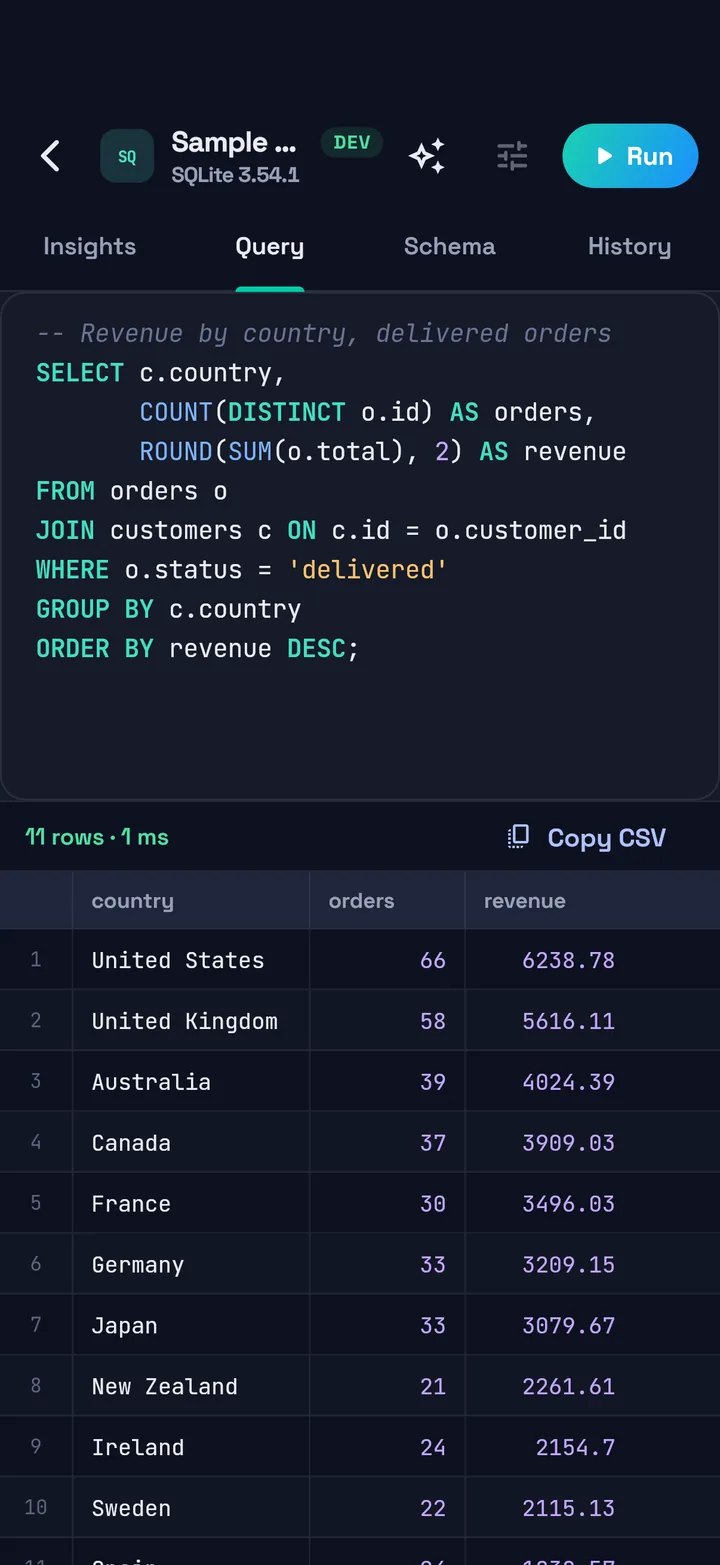
To practise on more data, connect to the free read-only PostgreSQL demo: its orders table has customer_id, ordered_at and total columns like the examples, plus status and shipping country, and a monthly_revenue view. Tablux shows grouped results in a grid you can copy as CSV, on a Mac, iPhone or iPad. To go further, window functions add group totals to each row without collapsing them.
Questions
What is the difference between WHERE and HAVING?
WHERE filters individual rows before grouping. HAVING filters the groups after aggregates are calculated, so only HAVING can use COUNT, SUM and other aggregates.
Can I GROUP BY multiple columns?
Yes. GROUP BY country, name returns one row for each distinct combination of country and name.
Why do I get “isn't in GROUP BY” or “must appear in the GROUP BY clause”?
A selected column is neither in GROUP BY nor inside an aggregate. Add it to GROUP BY, wrap it in MIN or MAX, or group by the table's primary key.
Does GROUP BY include NULL values?
Yes. All NULLs in a grouping column form one group. Aggregates such as SUM and COUNT(column) skip NULL values inside a group.
Does GROUP BY sort the results?
No. The order of grouped rows is not guaranteed. Add ORDER BY to sort them.
What is the difference between COUNT(*) and COUNT(column)?
COUNT(*) counts rows. COUNT(column) counts rows where that column is not NULL, which matters after a LEFT JOIN.
Updated 2026-11-25