 Tablux
Guide
SQL query examples: 36 sample queries for everyday work
Below are 36 practical SQL query examples, from SELECT … WHERE and joins to grouping, subqueries, CTEs, window functions, date and string functions, upserts and safe UPDATE and DELETE. They all use one small shop schema (customers, orders, order items, products) and run on PostgreSQL, MySQL, MariaDB and SQLite; where the syntax differs, each version is shown.
The sample schema
Four tables: customers place orders, and each order has lines that point to products.
CREATE TABLE customers (
  id         INT PRIMARY KEY,
  name       VARCHAR(100) NOT NULL,
  email      VARCHAR(200) NOT NULL,
  country    VARCHAR(50),
  created_at DATE NOT NULL
);

CREATE TABLE products (
  id       INT PRIMARY KEY,
  name     VARCHAR(100) NOT NULL,
  category VARCHAR(50) NOT NULL,
  price    DECIMAL(10,2) NOT NULL
);

CREATE TABLE orders (
  id          INT PRIMARY KEY,
  customer_id INT NOT NULL,
  ordered_at  DATE NOT NULL,
  status      VARCHAR(20) NOT NULL,      -- pending, shipped, delivered, cancelled
  total       DECIMAL(10,2) NOT NULL,
  FOREIGN KEY (customer_id) REFERENCES customers (id)
);

CREATE TABLE order_items (
  order_id   INT NOT NULL,
  product_id INT NOT NULL,
  quantity   INT NOT NULL,
  unit_price DECIMAL(10,2) NOT NULL,
  PRIMARY KEY (order_id, product_id),
  FOREIGN KEY (order_id) REFERENCES orders (id),
  FOREIGN KEY (product_id) REFERENCES products (id)
);
The examples were tested on PostgreSQL 16, MySQL 8.0, MariaDB 10.11 and SQLite 3.45 with a handful of rows in each table. Use a table-level FOREIGN KEY clause as above: MySQL 8.0 silently ignores a REFERENCES written after a column definition.
Select, filter and sort
1. Look at the first rows of a table.
SELECT * FROM customers LIMIT 10;LIMIT works in PostgreSQL, MySQL, MariaDB and SQLite. PostgreSQL and MariaDB also accept the standard FETCH FIRST 10 ROWS ONLY; SQL Server uses SELECT TOP 10 *. In real queries, list the columns you need instead of *.
2. Filter rows with WHERE.
SELECT name, email
FROM customers
WHERE country = 'Brazil';
Text values go in single quotes. Double quotes are for identifiers in standard SQL and PostgreSQL.
3. Combine conditions with AND, OR and IN.
SELECT id, customer_id, total
FROM orders
WHERE status IN ('shipped', 'delivered')
  AND total >= 50;
When you mix AND and OR, add parentheses: AND binds tighter.
4. Rows in a date range.
SELECT id, ordered_at, total
FROM orders
WHERE ordered_at >= '2026-02-01'
  AND ordered_at <  '2026-03-01';
A half-open range (>= start, < next start) stays correct when the column is a timestamp. BETWEEN '2026-02-01' AND '2026-02-28' would miss everything after midnight on the 28th.
5. Search text with LIKE.
SELECT name, email
FROM customers
WHERE email LIKE '%@example.com';
% matches any characters, _ exactly one. Case sensitivity differs: PostgreSQL's LIKE is case-sensitive (use ILIKE); MySQL and MariaDB follow the column's collation, which is case-insensitive by default; SQLite's LIKE ignores case for ASCII letters. LOWER(email) LIKE '%@example.com' behaves the same everywhere.
6. Sort and take the top N.
SELECT name, price
FROM products
ORDER BY price DESC
LIMIT 3;
7. List the distinct values in a column.
SELECT DISTINCT country
FROM customers
ORDER BY country;
NULL appears once in the list. It sorts last in PostgreSQL and first in MySQL, MariaDB and SQLite.
8. Page through results.
-- page 3 with 20 rows per page
SELECT id, name FROM customers ORDER BY id LIMIT 20 OFFSET 40;

-- faster on big tables: continue after the last id you showed
SELECT id, name FROM customers WHERE id > 140 ORDER BY id LIMIT 20;
OFFSET still reads and skips the earlier rows, so deep pages get slow. The second form (keyset pagination) uses the index on id.
Joins
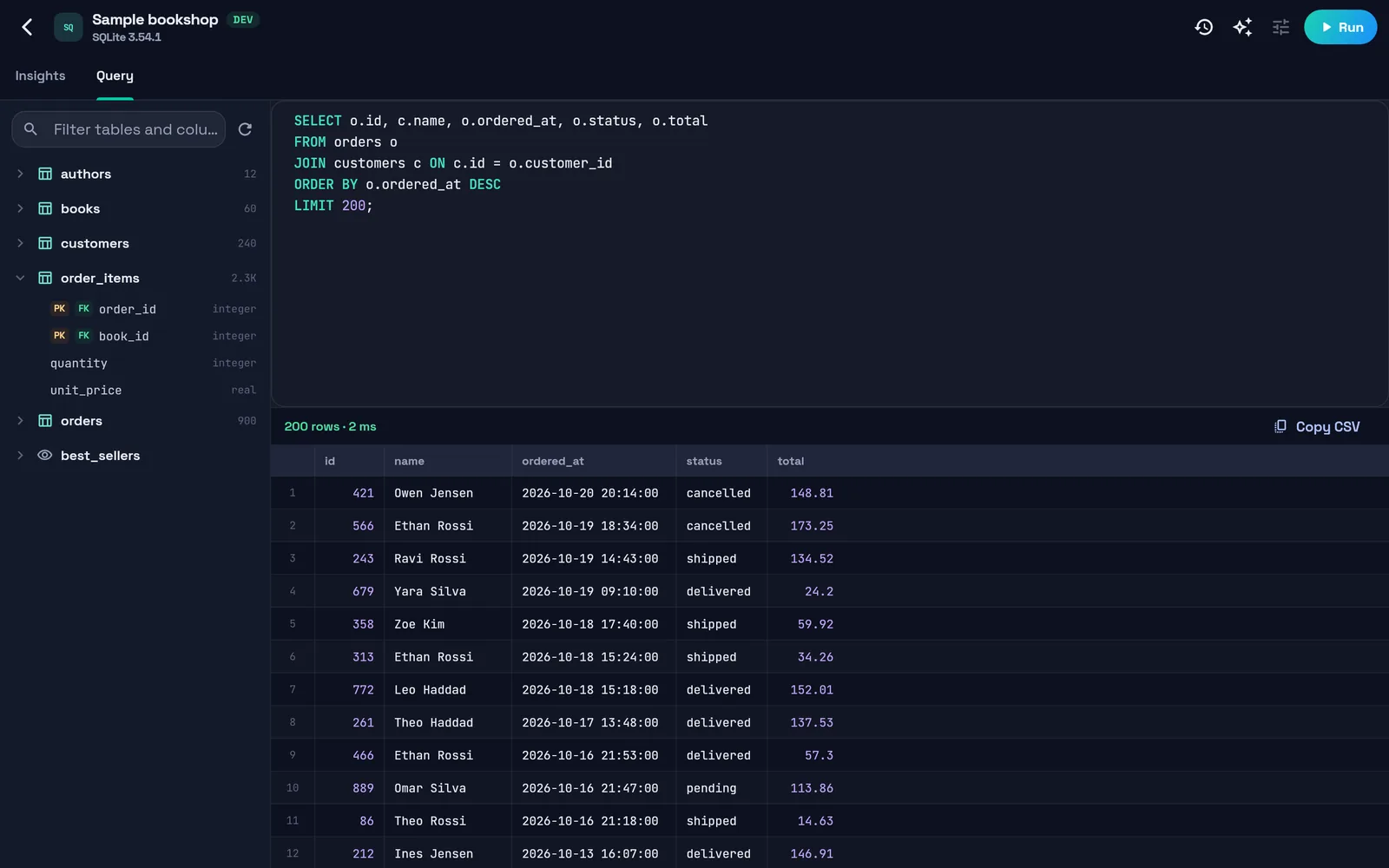
9. Join two tables (INNER JOIN).
SELECT o.id, c.name, o.ordered_at, o.total
FROM orders o
JOIN customers c ON c.id = o.customer_id
ORDER BY o.ordered_at;
JOIN means INNER JOIN: orders without a matching customer are left out.
10. Join three tables: the lines of one order.
SELECT p.name AS product, i.quantity, i.unit_price,
       i.quantity * i.unit_price AS line_total
FROM order_items i
JOIN products p ON p.id = i.product_id
WHERE i.order_id = 104;
11. Keep rows without a match (LEFT JOIN).
SELECT c.name, COUNT(o.id) AS orders
FROM customers c
LEFT JOIN orders o ON o.customer_id = c.id
GROUP BY c.id, c.name
ORDER BY orders DESC, c.name;
Customers with no orders get 0. Count o.id, not *, or they would get 1. More in SQL GROUP BY.
12. Find rows with no match (anti-join).
-- customers who never ordered
SELECT c.id, c.name
FROM customers c
WHERE NOT EXISTS (SELECT 1 FROM orders o WHERE o.customer_id = c.id);

-- products never sold
SELECT p.id, p.name
FROM products p
LEFT JOIN order_items i ON i.product_id = p.id
WHERE i.product_id IS NULL;
Avoid WHERE id NOT IN (SELECT customer_id FROM orders) when that column can be NULL: a single NULL in the subquery makes NOT IN return no rows at all.
Aggregates and GROUP BY
13. Count rows per value.
SELECT status, COUNT(*) AS orders
FROM orders
GROUP BY status
ORDER BY orders DESC;
14. Totals per customer, keeping only the big ones (HAVING).
SELECT c.name, COUNT(*) AS orders, SUM(o.total) AS revenue
FROM orders o
JOIN customers c ON c.id = o.customer_id
WHERE o.status <> 'cancelled'
GROUP BY c.id, c.name
HAVING SUM(o.total) > 100
ORDER BY revenue DESC;
WHERE filters rows before grouping; HAVING filters the groups.
15. Best-selling products.
SELECT p.name, SUM(i.quantity) AS units,
       SUM(i.quantity * i.unit_price) AS revenue
FROM order_items i
JOIN products p ON p.id = i.product_id
GROUP BY p.id, p.name
ORDER BY units DESC
LIMIT 5;
16. Find duplicates.
SELECT LOWER(email) AS email, COUNT(*) AS accounts
FROM customers
GROUP BY LOWER(email)
HAVING COUNT(*) > 1;
LOWER catches addresses that differ only in case. In MySQL and MariaDB, the default case-insensitive collation already groups them together.
Subqueries and CTEs
17. Compare with an overall value (scalar subquery).
SELECT id, total
FROM orders
WHERE total > (SELECT AVG(total) FROM orders);
18. Compare with the row's own group (correlated subquery).
-- products priced above their category's average
SELECT p.name, p.category, p.price
FROM products p
WHERE p.price > (SELECT AVG(p2.price)
                 FROM products p2
                 WHERE p2.category = p.category);
19. Name a step with a CTE.
WITH first_orders AS (
  SELECT customer_id, MIN(ordered_at) AS first_order
  FROM orders
  GROUP BY customer_id
)
SELECT c.name, f.first_order
FROM first_orders f
JOIN customers c ON c.id = f.customer_id
ORDER BY f.first_order;
CTEs need MySQL 8.0+ or MariaDB 10.2+. See the CTE guide for multiple and recursive CTEs.
Window functions
20. The latest order per customer.
SELECT id, customer_id, ordered_at, total
FROM (
  SELECT o.*,
         ROW_NUMBER() OVER (PARTITION BY customer_id
                            ORDER BY ordered_at DESC, id DESC) AS rn
  FROM orders o
) latest
WHERE rn = 1;
21. A running total.
SELECT ordered_at, total,
       SUM(total) OVER (ORDER BY ordered_at, id) AS running_total
FROM orders;
Window functions need MySQL 8.0+, MariaDB 10.2+ or SQLite 3.25+. The window functions guide covers ranking, LAG/LEAD and moving averages.
Dates
Date functions are where databases differ most. Each example shows PostgreSQL, MySQL/MariaDB and SQLite.
22. Revenue per month.
-- PostgreSQL
SELECT date_trunc('month', ordered_at)::date AS month, COUNT(*) AS orders, SUM(total) AS revenue
FROM orders GROUP BY 1 ORDER BY 1;

-- MySQL / MariaDB
SELECT DATE_FORMAT(ordered_at, '%Y-%m-01') AS month, COUNT(*) AS orders, SUM(total) AS revenue
FROM orders GROUP BY month ORDER BY month;

-- SQLite
SELECT strftime('%Y-%m-01', ordered_at) AS month, COUNT(*) AS orders, SUM(total) AS revenue
FROM orders GROUP BY month ORDER BY month;
23. Rows from the last 30 days.
-- PostgreSQL
WHERE ordered_at >= CURRENT_DATE - INTERVAL '30 days'
-- MySQL / MariaDB
WHERE ordered_at >= CURRENT_DATE - INTERVAL 30 DAY
-- SQLite
WHERE ordered_at >= date('now', '-30 days')
SQLite's date('now') is in UTC. Use date('now', 'localtime') for the device's time zone.
24. Days since each customer's last order.
-- PostgreSQL (date minus date = days)
SELECT c.name, CURRENT_DATE - MAX(o.ordered_at) AS days_since
FROM customers c JOIN orders o ON o.customer_id = c.id
GROUP BY c.id, c.name;

-- MySQL / MariaDB
SELECT c.name, DATEDIFF(CURRENT_DATE, MAX(o.ordered_at)) AS days_since ...

-- SQLite
SELECT c.name, CAST(julianday('now') - julianday(MAX(o.ordered_at)) AS INTEGER) AS days_since ...
Strings
25. Join strings and split an email address.
-- PostgreSQL
SELECT name || ' <' || email || '>' AS contact, split_part(email, '@', 2) AS domain
FROM customers;

-- MySQL / MariaDB
SELECT CONCAT(name, ' <', email, '>') AS contact, SUBSTRING_INDEX(email, '@', -1) AS domain
FROM customers;

-- SQLite
SELECT name || ' <' || email || '>' AS contact, substr(email, instr(email, '@') + 1) AS domain
FROM customers;
In MySQL, || means OR unless PIPES_AS_CONCAT is set, so use CONCAT(). CONCAT() also exists in PostgreSQL and in SQLite 3.44+. With ||, a NULL part makes the whole result NULL.
26. List the products in each order as one string.
-- PostgreSQL (and SQLite 3.44+)
SELECT o.id, string_agg(p.name, ', ' ORDER BY p.name) AS products
FROM orders o
JOIN order_items i ON i.order_id = o.id
JOIN products p ON p.id = i.product_id
GROUP BY o.id;

-- MySQL / MariaDB
SELECT o.id, GROUP_CONCAT(p.name ORDER BY p.name SEPARATOR ', ') AS products ...
MySQL cuts GROUP_CONCAT results at group_concat_max_len bytes (1024 by default).
27. Common string functions.
SELECT UPPER(name), LOWER(email), LENGTH(name), TRIM('  padded  '),
       REPLACE(email, '@example.com', '')
FROM customers
WHERE id = 1;
In MySQL and MariaDB, LENGTH() counts bytes, so accented and non-Latin text looks longer than it is; use CHAR_LENGTH() for characters. PostgreSQL and SQLite count characters.
CASE and NULL handling
28. Put rows into buckets with CASE.
SELECT id, total,
       CASE WHEN total >= 100 THEN 'large'
            WHEN total >= 40  THEN 'medium'
            ELSE 'small'
       END AS size
FROM orders;
The first matching WHEN wins, so order the conditions from most to least specific.
29. Count several conditions in one pass.
SELECT SUM(CASE WHEN status = 'delivered' THEN 1 ELSE 0 END) AS delivered,
       SUM(CASE WHEN status = 'pending'   THEN 1 ELSE 0 END) AS pending,
       SUM(CASE WHEN status = 'cancelled' THEN 1 ELSE 0 END) AS cancelled
FROM orders;
This is the portable way to pivot values into columns. PostgreSQL and SQLite 3.30+ also have COUNT(*) FILTER (WHERE status = 'pending').
30. Replace or find missing values.
SELECT name, COALESCE(country, 'Unknown') AS country FROM customers;

SELECT name FROM customers WHERE country IS NULL;
country = NULL is never true; always use IS NULL or IS NOT NULL.
31. Avoid division by zero.
SELECT 100.0 * SUM(CASE WHEN status = 'cancelled' THEN 1 ELSE 0 END)
       / NULLIF(COUNT(*), 0) AS cancel_rate
FROM orders
WHERE ordered_at >= '2027-01-01';
With no matching rows, COUNT(*) is 0. NULLIF turns it into NULL, so the result is NULL instead of an error. PostgreSQL raises division by zero without it; MySQL, MariaDB and SQLite quietly return NULL. Multiplying by 100.0 avoids integer division in PostgreSQL and SQLite.
Insert, upsert, update and delete
Try write statements on a copy or a development database first.
32. Insert several rows at once.
INSERT INTO products (id, name, category, price)
VALUES (8, 'Sticky notes', 'Stationery', 3.20),
       (9, 'Mouse pad',    'Home',        9.00);
Always list the columns, so the statement still works after someone adds a column.
33. Insert or update (upsert).
-- PostgreSQL 9.5+ and SQLite 3.24+
INSERT INTO products (id, name, category, price)
VALUES (8, 'Sticky notes', 'Stationery', 3.50)
ON CONFLICT (id) DO UPDATE SET price = excluded.price;

-- MySQL 8.0.19+
INSERT INTO products (id, name, category, price)
VALUES (8, 'Sticky notes', 'Stationery', 3.50) AS new
ON DUPLICATE KEY UPDATE price = new.price;

-- MariaDB (and older MySQL)
INSERT INTO products (id, name, category, price)
VALUES (8, 'Sticky notes', 'Stationery', 3.50)
ON DUPLICATE KEY UPDATE price = VALUES(price);
MySQL 8.0 still runs the VALUES(price) form but warns that it is deprecated; MariaDB does not accept the AS new alias. Avoid REPLACE INTO for upserts: it deletes the old row and inserts a new one, which fires delete triggers and cascades. PostgreSQL 15+ also has MERGE.
34. Update safely: preview, then change, inside a transaction.
BEGIN;                      -- MySQL / MariaDB: START TRANSACTION;

SELECT id, status, ordered_at          -- 1. preview the rows
FROM orders
WHERE status = 'pending' AND ordered_at < '2026-03-15';

UPDATE orders                          -- 2. same WHERE clause
SET status = 'cancelled'
WHERE status = 'pending' AND ordered_at < '2026-03-15';

-- 3. check the reported row count, then
COMMIT;                     -- or ROLLBACK; to undo
Write the WHERE clause first and test it as a SELECT. An UPDATE without WHERE changes every row. In the mysql client, --safe-updates refuses UPDATE and DELETE statements that have no key in the WHERE clause and no LIMIT. Note that MySQL and MariaDB commit DDL such as ALTER TABLE immediately, even inside a transaction.
35. Update from another table.
-- PostgreSQL, and SQLite 3.33+
UPDATE products AS p SET price = p.price * 1.10
FROM order_items i
WHERE i.product_id = p.id AND i.order_id = 104;

-- MySQL / MariaDB
UPDATE products p
JOIN order_items i ON i.product_id = p.id
SET p.price = p.price * 1.10
WHERE i.order_id = 104;
SQLite needs the AS before the alias (UPDATE products p is a syntax error there); PostgreSQL accepts both. SQL Server has its own UPDATE … FROM form.
36. Delete safely, children first.
BEGIN;
DELETE FROM order_items
WHERE order_id IN (SELECT id FROM orders WHERE status = 'cancelled');

DELETE FROM orders
WHERE status = 'cancelled';
COMMIT;
Rows referenced by a foreign key must go first, unless the key was declared with ON DELETE CASCADE. Run the WHERE clauses as SELECT COUNT(*) before deleting, and take a backup before large deletes. TRUNCATE empties a whole table and cannot be filtered.
Try them on a demo database
To run the read-only examples without setting anything up, connect to the free PostgreSQL demo database. It is a larger online shop with tables of the same names, but its columns differ: customers have joined_on instead of created_at, products link to a categories table through category_id, ordered_at is a timestamp, and orders also have ship_country, channel, subtotal and shipping. Adjust those names and most queries run as written. The demo is read-only, so the insert, update and delete examples are refused there.
In Tablux on a Mac, iPhone or iPad, you can run these against the demo or your own PostgreSQL, MySQL, MariaDB or SQLite databases. Tablux asks for confirmation before an UPDATE or DELETE without WHERE, DROP or TRUNCATE, and refuses writes on connections marked read-only (production safety). If you would rather describe what you want, the AI assistant writes the SQL into the editor for you to check and run.
Questions
What are the basic SQL queries?
SELECT to read rows, INSERT to add them, UPDATE to change them and DELETE to remove them. Most reading queries combine SELECT with WHERE, JOIN, GROUP BY and ORDER BY.
Do these SQL examples work in MySQL and PostgreSQL?
Yes. Most are standard SQL and run unchanged on PostgreSQL, MySQL, MariaDB and SQLite. Dates, string functions and upserts differ, so those examples show each version.
How do I limit the number of rows returned?
Add LIMIT n at the end in PostgreSQL, MySQL, MariaDB and SQLite. SQL Server uses SELECT TOP n, and the SQL standard form is FETCH FIRST n ROWS ONLY.
How do I avoid updating or deleting the wrong rows?
Write the WHERE clause first and run it as a SELECT, then run the UPDATE or DELETE inside a transaction and check the row count before COMMIT.
Where can I practise SQL queries online?
Tablux runs a free, read-only PostgreSQL demo database at tablux.app/demo that any PostgreSQL client can connect to, with no sign-up.
Updated 2026-11-26